With 200+ AWS services and constantly evolving cloud technology, preparing for the AWS Cloud Practitioner exam can feel overwhelming. You're not sure which resources actually work, how long you'll realistically need to study, or which services to prioritize out of the hundreds available.
The CLF-C02 exam (current version since September 2023) tests different domains than older guides cover, including new AI/ML services and updated security weightings. Using outdated study materials is one of the top reasons candidates fail.
This guide provides experience-specific study paths (complete beginner to IT professional), a service prioritization matrix so you know exactly what to study, and the free and paid resources that actually prepare you for the current exam. Based on official AWS exam guides, AWS Skill Builder resources, and analysis of successful candidate journeys.
What is the AWS Cloud Practitioner Exam?
The AWS Certified Cloud Practitioner is a foundational certification that validates your overall knowledge of the AWS Cloud. It's designed for individuals who can demonstrate a general understanding of AWS services, architecture principles, security, and billing, independent of a specific technical role.
This certification serves as the entry point to the AWS certification ecosystem, making it ideal for:
- Career changers transitioning into cloud roles from non-IT backgrounds
- Business professionals (sales, marketing, project managers) seeking cloud literacy
- Technical team members who need to communicate effectively with cloud engineers
- Students and recent graduates entering the technology industry
- IT professionals validating their foundational AWS knowledge
The target candidate profile includes individuals with up to 6 months of AWS Cloud exposure, though this is a recommendation rather than a requirement. Importantly, the exam does not test coding ability, cloud architecture design, troubleshooting skills, or implementation expertise. If you can navigate the AWS Console and understand what services do at a high level, you have the foundation to begin preparing.
CLF-C02 vs CLF-C01: What Changed
If you've found study materials referencing CLF-C01, here's what you need to know: CLF-C01 was retired on September 18, 2023, and only CLF-C02 is now available.
The domain weightings shifted significantly between versions:
| Domain | CLF-C01 | CLF-C02 | Change |
|---|---|---|---|
| Cloud Concepts | 26% | 24% | -2% |
| Security and Compliance | 25% | 30% | +5% |
| Cloud Technology and Services | 33% | 34% | +1% |
| Billing, Pricing, and Support | 16% | 12% | -4% |
Beyond weighting changes, CLF-C02 introduced several new topics:
- AI/ML services: SageMaker, Lex, Kendra, and other machine learning services now appear in Domain 3
- Sustainability pillar: The Well-Architected Framework expanded from 5 to 6 pillars
- Modern security services: Security Hub, GuardDuty, Detective, and IAM Identity Center are now explicitly covered
- Application integration: EventBridge, SNS, and SQS receive more emphasis
The good news: CLF-C01 materials remain approximately 80% valid for core concepts. If you're using older resources, supplement them with coverage of AI/ML services and the expanded security section.
Who Should Take This Exam
AWS defines the target candidate as someone with "up to 6 months of exposure to AWS Cloud design, implementation, and/or operations." But let me clarify what this actually means in practice.
You don't need 6 months of experience to pass. Many candidates with no prior AWS exposure pass within weeks of focused study. The "6 months exposure" is AWS's way of saying you should be familiar with cloud concepts, not that you need half a year of hands-on work.
You're ready to start preparing if you:
- Understand basic IT concepts (what a server is, how networks function)
- Can navigate web-based interfaces
- Have genuine interest in learning cloud computing
What's explicitly out of scope:
- Writing code or programming
- Designing cloud architecture solutions
- Troubleshooting production issues
- Implementing AWS services from scratch
- Load and performance testing
This is a foundational exam that validates conceptual understanding, not hands-on engineering skills. The follow-up associate certifications test those deeper competencies.
CLF-C02 Exam Structure and Format
Understanding the exam mechanics helps you prepare strategically and manage test-day anxiety. Here's exactly what you'll face:
| Specification | Details |
|---|---|
| Total Questions | 65 (50 scored + 15 unscored) |
| Duration | 90 minutes |
| Cost | $100 USD (EUR 92, AUD 150) |
| Passing Score | 700 out of 1,000 |
| Question Types | Multiple choice and multiple response |
| Languages | 13 (including Arabic added August 2025) |
The 15 unscored questions are used by AWS to evaluate potential future exam questions. You cannot identify which questions are unscored, so treat every question as if it counts.
Question Types and Scoring
Multiple Choice Questions:
- One correct answer from four options
- Three incorrect options (distractors) designed to be plausible
Multiple Response Questions:
- Two or more correct answers from five or more options
- You must select all correct answers to receive credit
- The question specifies how many answers to choose
Scoring Model: AWS uses compensatory scoring, which means you don't need to pass each domain individually. A strong performance in Domain 3 (Technology) can compensate for weaker performance in Domain 4 (Billing). Your goal is achieving 700+ overall, not perfection in every section.
Critical rule: There's no penalty for guessing. Unanswered questions are marked incorrect. Always answer every question, even if you're uncertain. Eliminating one or two obviously wrong answers improves your guessing odds significantly.
Time Management Strategy
With 65 questions in 90 minutes, you have approximately 1 minute and 23 seconds per question. Here's a three-pass approach that works:
First Pass (45-60 minutes): Answer questions you know confidently. Don't overthink. If you're uncertain after 30 seconds, flag the question and move on.
Second Pass (20-25 minutes): Return to flagged questions. With fresh perspective and less time pressure, many become clearer. Use elimination to improve your odds on difficult questions.
Final Review (5-10 minutes): Check for unanswered questions (critical!). Review any answers you're still uncertain about. Resist the urge to change answers unless you have a specific reason.
This strategy prevents you from spending 5 minutes on a single difficult question while leaving easier questions unanswered at the end.
Exam Domains Breakdown (CLF-C02)
The exam covers four domains, each with specific task statements that define exactly what you'll be tested on. Understanding these domains helps you prioritize your study time based on weighting and your personal knowledge gaps.
Domain 1: Cloud Concepts (24%)
This domain covers the fundamental "why" behind cloud computing. You'll need to understand:
Task 1.1: Define the benefits of the AWS Cloud
- Value proposition: agility, elasticity, cost savings, global reach
- Speed of deployment compared to traditional infrastructure
- High availability and fault tolerance concepts
Task 1.2: Identify design principles of the AWS Cloud
- AWS Well-Architected Framework and its six pillars: operational excellence, security, reliability, performance efficiency, cost optimization, and sustainability (the newest pillar)
- How these pillars trade off against each other in real architectures
Task 1.3: Understand benefits and strategies for migration
- AWS Cloud Adoption Framework (AWS CAF) components
- Migration strategies (the "7 Rs": rehost, replatform, repurchase, refactor, retire, retain, relocate)
- Tools like AWS Migration Hub and AWS Snowball
Task 1.4: Understand concepts of cloud economics
- Fixed costs vs. variable costs (CapEx vs. OpEx)
- Total Cost of Ownership (TCO) considerations
- Licensing strategies (BYOL vs. included licenses)
- Rightsizing and the benefits of automation
- Economies of scale that AWS provides
Key concept to remember: The Well-Architected Framework now has six pillars, not five. Sustainability was added and is fair game on the exam.
Domain 2: Security and Compliance (30%)
Security is the largest domain by weight, increased from 25% in CLF-C01. This reflects AWS's emphasis on security as a foundational concern.
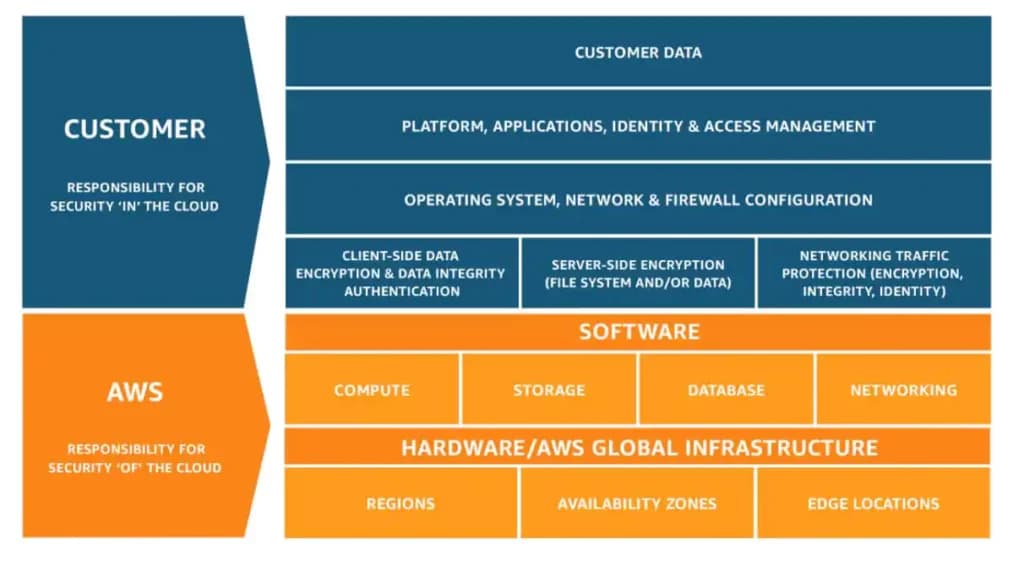
Task 2.1: Understand the AWS Shared Responsibility Model
- AWS responsibility: Security "of" the cloud (hardware, networking, facilities)
- Customer responsibility: Security "in" the cloud (data, applications, access management)
- How responsibility shifts by service type (EC2 vs. Lambda vs. RDS)
Task 2.2: Understand AWS Cloud security, governance, and compliance concepts
- AWS Artifact for compliance reports and agreements
- Encryption options (at rest and in transit)
- Governance services: CloudWatch, CloudTrail, AWS Config, AWS Audit Manager
- Security services: Amazon Inspector, AWS Security Hub, Amazon GuardDuty, AWS Shield
Task 2.3: Identify AWS access management capabilities
- IAM users, groups, roles, and policies
- Root user protection and when root is required
- Principle of least privilege
- AWS IAM Identity Center (formerly AWS SSO)
- Multi-factor authentication (MFA) requirements
- Credential storage: AWS Secrets Manager, AWS Systems Manager Parameter Store
Task 2.4: Identify components and resources for security
- AWS WAF, AWS Firewall Manager, AWS Shield
- Third-party security products in AWS Marketplace
- AWS Trusted Advisor security checks
- Security resources: AWS Security Blog, AWS Knowledge Center
Pro tip: Know the Shared Responsibility Model cold. It appears in multiple questions, and understanding how responsibility shifts between IaaS (EC2), PaaS (RDS), and serverless (Lambda) is essential.
Domain 3: Cloud Technology and Services (34%)
This is the largest domain and covers the broadest range of AWS services. You don't need to know every service deeply, but you need to understand what each does and when to use it.
Task 3.1: Define methods of deploying and operating in AWS Cloud
- Access methods: AWS Management Console, CLI, SDKs, Infrastructure as Code
- Deployment models: cloud, hybrid, on-premises
- Infrastructure as Code vs. manual configuration
Task 3.2: Define AWS global infrastructure
- Regions, Availability Zones, and edge locations
- When to use multiple regions (disaster recovery, latency, data sovereignty)
- Why Availability Zones don't share single points of failure
Task 3.3: Identify AWS compute services
- Amazon EC2 and instance type families
- Containers: Amazon ECS, Amazon EKS
- Serverless: AWS Lambda, AWS Fargate
- Auto Scaling and Elastic Load Balancing
Task 3.4: Identify AWS database services
- Relational: Amazon RDS, Amazon Aurora
- NoSQL: Amazon DynamoDB
- In-memory: Amazon ElastiCache
- Migration tools: AWS DMS, AWS SCT
Task 3.5: Identify AWS network services
- Amazon VPC components (subnets, gateways, route tables)
- Security groups and network ACLs
- Amazon Route 53 for DNS
- Connectivity: AWS VPN, AWS Direct Connect
Task 3.6: Identify AWS storage services
- Amazon S3 and storage classes
- Block storage: Amazon EBS, instance store
- File storage: Amazon EFS, Amazon FSx
- Hybrid: AWS Storage Gateway
- Backup: AWS Backup
Task 3.7: Identify AI/ML and analytics services (New in CLF-C02)
- AI/ML: Amazon SageMaker, Amazon Lex, Amazon Kendra, Amazon Rekognition
- Analytics: Amazon Athena, Amazon Kinesis, AWS Glue, Amazon QuickSight
Task 3.8: Identify other in-scope service categories
- Application integration: Amazon EventBridge, Amazon SNS, Amazon SQS
- Developer tools: AWS CodeBuild, AWS CodePipeline, AWS X-Ray
- End-user computing: Amazon WorkSpaces, Amazon AppStream 2.0
- IoT: AWS IoT Core
- Frontend/mobile: AWS Amplify, AWS AppSync
Domain 4: Billing, Pricing, and Support (12%)
The smallest domain by weight, but don't overlook it. Questions here are often straightforward if you understand the pricing models.
Task 4.1: Compare AWS pricing models
- On-Demand, Reserved Instances, Spot Instances, Savings Plans
- Dedicated Hosts and Dedicated Instances
- Data transfer pricing (cross-region costs more than within region)
- Storage pricing tiers
Task 4.2: Understand billing, budget, and cost management resources
- AWS Budgets and AWS Cost Explorer
- AWS Pricing Calculator
- AWS Organizations consolidated billing
- Cost allocation tags
- AWS Cost and Usage Report
Task 4.3: Identify AWS technical resources and support options
- AWS Support plans: Developer, Business, Enterprise On-Ramp, Enterprise
- AWS Trusted Advisor
- AWS Health Dashboard
- AWS re:Post, AWS Knowledge Center
- AWS Partners and AWS Marketplace
Study Plan by Experience Level
The "one-size-fits-all" study plan doesn't work. Your background determines how quickly you can absorb the material. Here's how to calibrate your timeline:
Complete Beginner (No IT Background): 6-8 Weeks
If you're new to both IT and cloud computing, budget 6-8 weeks of consistent study. This isn't about cramming but building genuine understanding.
Weeks 1-2: Foundation Building
- Complete AWS Cloud Practitioner Essentials course (13 modules)
- Create your free AWS account and explore the Console
- Focus on understanding what "the cloud" actually is
Weeks 3-4: Core Services Deep Dive
- Study compute, storage, and database services
- Complete 5-6 hands-on labs in AWS Builder Labs
- Take the Official Pretest to identify knowledge gaps
Weeks 5-6: Security and Domains Review
- Focus heavily on Domain 2 (Security) at 30% of the exam
- Study the Shared Responsibility Model until it's automatic
- Review billing concepts and support plans
Weeks 7-8: Practice and Polish
- Take multiple practice exams
- Review weak areas identified by practice tests
- Schedule and take your exam
Daily commitment: 1-2 hours. Consistent daily study beats weekend cramming.
IT Professional New to Cloud: 3-4 Weeks
If you have IT experience but haven't worked with AWS, you can accelerate the timeline. Your existing knowledge of servers, networking, and security translates directly.
Week 1: Rapid Foundation
- Take Official Pretest immediately to identify gaps
- Complete Cloud Practitioner Essentials course (focus on unfamiliar sections)
- Map your existing IT knowledge to AWS equivalents
Week 2: Services and Hands-On
- Study the service priority matrix (below)
- Complete core hands-on labs
- Focus on cloud-specific concepts (serverless, managed services)
Week 3: Security and Practice
- Deep dive on security services and IAM
- Take multiple practice exams
- Review wrong answers thoroughly
Week 4: Final Preparation
- Take Official Practice Exam
- Fill remaining gaps
- Schedule and take exam
Daily commitment: 2-3 hours. Your IT foundation lets you move faster.
Cloud-Adjacent (Azure/GCP Experience): 2-3 Weeks
If you already work with another cloud provider, you understand cloud concepts. Your focus is learning AWS-specific services and terminology.
Week 1: AWS-Specific Translation
- Map your existing cloud knowledge to AWS services
- Focus on AWS terminology (VPC vs. VNet, IAM vs. Cloud IAM)
- Take pretest to identify actual gaps
Week 2: Fill Gaps and Practice
- Study AWS-specific services (Organizations, Control Tower, AWS-specific pricing)
- Focus on the Shared Responsibility Model (it differs from Azure)
- Take practice exams
Week 3 (if needed): Polish
- Address remaining weak areas
- Final practice exam
- Take the certification exam
Daily commitment: 2 hours. Leverage your existing cloud mental model.
AWS Service Priority Matrix: What to Actually Study
With 200+ AWS services, knowing what to prioritize is critical. This matrix is based on the CLF-C02 exam guide task statements and service mentions.
Tier 1: Must Know Cold (15-20 Services)
These services appear repeatedly in exam questions. You should understand what they do, when to use them, and how they differ from alternatives.
Compute:
- Amazon EC2 (virtual servers, instance families)
- AWS Lambda (serverless compute)
- Amazon ECS/EKS (containers)
Storage:
- Amazon S3 (object storage, storage classes)
- Amazon EBS (block storage for EC2)
- Amazon EFS (managed file storage)
Database:
- Amazon RDS (managed relational databases)
- Amazon DynamoDB (NoSQL)
- Amazon Aurora (MySQL/PostgreSQL compatible)
Networking:
- Amazon VPC (virtual private cloud)
- Amazon Route 53 (DNS)
- Amazon CloudFront (CDN)
- Elastic Load Balancing
Security:
- AWS IAM (identity and access management)
- AWS KMS (key management)
- Amazon GuardDuty (threat detection)
Tier 2: Solid Understanding (20-30 Services)
Know what these services do and their primary use cases.
Monitoring and Management:
- Amazon CloudWatch (metrics, logs, alarms)
- AWS CloudTrail (API logging)
- AWS Config (configuration tracking)
- AWS Systems Manager
Security and Compliance:
- AWS Security Hub
- Amazon Inspector
- AWS WAF (web application firewall)
- AWS Shield (DDoS protection)
- AWS Secrets Manager
Migration and Transfer:
- AWS Migration Hub
- AWS DMS (Database Migration Service)
- AWS Snow Family (Snowball, Snowcone)
Application Integration:
- Amazon SNS (notifications)
- Amazon SQS (message queuing)
- Amazon EventBridge (event bus)
Tier 3: Awareness Level (30-40 Services)
Know what these services do at a high level. You don't need deep knowledge, but recognize them when they appear.
AI/ML (New in CLF-C02):
- Amazon SageMaker (ML model building)
- Amazon Lex (conversational AI)
- Amazon Kendra (intelligent search)
- Amazon Rekognition (image/video analysis)
- Amazon Polly (text-to-speech)
Analytics:
- Amazon Athena (S3 querying)
- Amazon Kinesis (streaming data)
- AWS Glue (ETL)
- Amazon QuickSight (BI dashboards)
Developer Tools:
- AWS CodeBuild, CodePipeline, CodeDeploy
- AWS X-Ray (distributed tracing)
Other Services:
- Amazon WorkSpaces (virtual desktops)
- AWS Amplify (frontend/mobile)
- AWS IoT Core
Confusing Service Pairs Explained
Several AWS services have overlapping use cases. Understanding the differences is commonly tested:
| Question | Answer |
|---|---|
| EBS vs EFS vs S3 | EBS = block storage attached to single EC2. EFS = file storage shared across multiple EC2. S3 = object storage accessed via API. |
| RDS vs DynamoDB vs Aurora | RDS = managed relational (MySQL, PostgreSQL). DynamoDB = serverless NoSQL. Aurora = high-performance relational (MySQL/PostgreSQL compatible). |
| Security Groups vs NACLs | Security Groups = stateful, instance-level. NACLs = stateless, subnet-level. |
| CloudWatch vs CloudTrail | CloudWatch = metrics and monitoring. CloudTrail = API call logging (who did what). |
| SNS vs SQS | SNS = push notifications (pub/sub). SQS = message queuing (decoupling). |
Best Study Resources (Free and Paid)
A common question: "Can I pass with only free materials?" Yes, absolutely. AWS provides exceptional free resources. Paid options offer convenience and additional practice, but aren't required.
Free Resources (AWS Skill Builder)
AWS Skill Builder is AWS's official learning platform with over 1,000 free courses available. For a comprehensive overview of all free options, see our guide on free AWS learning resources. For Cloud Practitioner, prioritize:
AWS Cloud Practitioner Essentials (Free)
- 13 comprehensive modules covering all exam domains
- Updated regularly to reflect current exam content
- Estimated completion: 8-12 hours
- Includes knowledge checks throughout
Official Practice Question Set (Free)
- Sample exam questions in the actual format
- Helps you understand question style and difficulty
Official Pretest (Free)
- Diagnostic assessment to identify knowledge gaps
- Take this early, not just before your exam
- Results guide your study focus
Official Practice Exam (Free or Subscription)
- Full-length practice exam
- Most accurate representation of the real exam
- Take this as your final readiness check
AWS Cloud Quest: Game-Based Learning
AWS Cloud Quest is a free, game-based learning experience that many candidates don't know about. You navigate a virtual city, interact with NPCs who have cloud problems, and build solutions in hands-on labs.
What you get:
- Interactive 3D environment with gamified progression
- Hands-on lab exercises in real AWS environments
- Learn-recommend-build approach for each solution
- Official AWS Cloud Quest badge upon completion
- Available in 7 languages
This is particularly effective for visual and kinesthetic learners who struggle with passive video courses.
AWS Builder Labs (Free Hands-On)
In December 2025, AWS launched the free "Introduction to AWS Cloud: Builder Labs Learning Plan" with 10 hands-on lab exercises:
Services covered:
- Amazon VPC
- Amazon S3
- Amazon EC2
- AWS IAM
- AWS KMS
- Amazon DynamoDB
- Amazon CloudFront
- AWS Lambda
- Amazon API Gateway
Each lab provides step-by-step guidance in a real AWS environment. No risk of charges since you're working in AWS-provisioned accounts.
Paid Resources Worth Considering
While free resources are sufficient, paid options can accelerate your preparation:
AWS Skill Builder Individual Subscription:
- 200+ additional AWS Builder Labs
- AWS Cloud Quest advanced roles
- AWS Jam challenges (real-world problem-solving)
- AWS SimuLearn experiences
- Enhanced exam prep materials
Exam Prep Classroom Courses (New December 2025):
- Instructor-led (recorded) comprehensive coverage
- Hands-on labs integrated throughout
- Knowledge checks and assessments
- Available with subscription or standalone
Third-Party Options:
- Udemy courses (frequently discounted to $15-20)
- Coursera AWS courses
- A Cloud Guru/Pluralsight
My recommendation: Start with free AWS Skill Builder resources. If you want more hands-on labs or structured practice, consider the subscription. Third-party courses are optional supplements.
Practice Tests and When to Take Them
Practice tests are tools for learning, not just assessment. Here's the strategic approach:
Early Assessment (First 25% of Study): Take the Official Pretest early to identify gaps. Don't wait until you feel "ready" because the pretest reveals what you don't know yet.
Ongoing Practice (Middle 50% of Study): Take practice questions after each domain study. Review wrong answers thoroughly. Understanding why an answer is wrong teaches more than celebrating correct ones.
Final Assessment (Last 25% of Study): Take the Official Practice Exam as your readiness check. Score 75%+ consistently before scheduling your real exam.
What practice scores mean:
- Below 60%: Need more study time
- 60-70%: Getting close, focus on weak areas
- 70-80%: Likely ready, polish weak spots
- Above 80%: Schedule your exam with confidence
Hands-On Practice: Why It's Non-Negotiable
Here's a story that illustrates why hands-on practice matters: A former professional athlete initially failed the Cloud Practitioner exam despite studying videos and documentation. After refocusing on hands-on application, they passed six weeks later and eventually became an AWS Technical Account Manager.
Theory alone isn't enough. Practical application cements theoretical knowledge and builds the intuition you need to answer scenario-based questions confidently.
AWS Free Tier
New AWS customers receive significant free resources to practice without financial risk:
Credits Program (2025):
- $100 in credits upon sign-up
- Additional $100 by completing activities (EC2, RDS, Lambda, Bedrock, Budgets)
- Credits valid for 12 months
- 6-month free account plan
Always Free Services (No time limit):
- AWS Lambda: 1 million requests/month
- Amazon DynamoDB: 25 GB storage
- Amazon CloudWatch: 10 custom metrics
- Amazon SNS: 1 million publishes
- 30+ additional services with monthly limits
Pro tip: Before practicing, secure your AWS account by enabling MFA on your root user and setting up AWS Budgets to alert you before unexpected charges occur.
Essential Hands-On Activities
Complete these activities during your study period:
- Launch EC2 instance - Understand compute fundamentals
- Create S3 bucket and upload files - Learn object storage
- Set up IAM users and roles - Critical security practice
- Configure VPC with subnets - Networking basics
- Create DynamoDB table - NoSQL database experience
- Deploy simple Lambda function - Serverless introduction
- Set up CloudWatch alarm - Monitoring fundamentals
- Configure AWS Budgets - Cost management awareness
Each activity reinforces exam concepts through practical experience. The free Builder Labs learning plan covers most of these if you prefer guided exercises.
Common Mistakes That Cause Failure
Learning from others' failures is faster than making them yourself. These are the patterns I've seen cause candidates to fail or score lower than expected:
Study Mistakes
Using Outdated CLF-C01 Materials The exam changed significantly. Using old materials means missing AI/ML services, updated security coverage, and incorrect domain weightings. Always verify your study materials target CLF-C02.
Skipping Hands-On Practice Candidates who rely solely on videos and reading consistently score lower than those who combine theory with hands-on labs. The exam includes scenario questions that test practical understanding.
Equal Focus on All Domains Don't spend 25% of your time on each domain. Domain 3 (Technology) is 34% of the exam. Domain 4 (Billing) is only 12%. Prioritize based on both weighting and your personal gaps.
Not Using the Official Exam Guide The exam guide lists exactly what's tested. Many candidates jump to courses without reading the official scope. Start with the exam guide to structure your study plan.
Taking the Exam Too Soon Aggressive timelines ("Pass in 1 week!") work for some candidates but fail many others. Be honest about your baseline knowledge. If practice tests show 60%, you're not ready.
Exam Day Mistakes
Not Answering Every Question There's no penalty for guessing. Unanswered questions are marked wrong. Always answer, even if you're uncertain.
Poor Time Management Getting stuck on difficult questions early leaves insufficient time for easier questions later. Flag and move on.
Second-Guessing Correct Answers Don't change answers unless you have a specific reason. First instincts are often correct when your knowledge is solid.
Using "Brain Dumps" Accessing unauthorized exam content violates AWS policy and can result in permanent ban from the certification program. AWS conducts rigorous forensics to detect this. Beyond policy, brain dumps defeat the purpose of certification, which is validating actual knowledge.
Exam Registration and Logistics
Reducing administrative anxiety helps you focus on preparation. Here's everything you need to know about the logistics. For strategies that apply to all AWS exams, see our guide on how to pass AWS certification exams.
Exam Cost and Discounts
Standard Pricing:
- USD: $100
- EUR: €92
- AUD: $150
- JPY: ¥15,000
Available Discounts:
- 50% off future exams after earning your first AWS certification
- 50% voucher for AWS re:Invent attendees
- Bulk vouchers available for organizations
AWS updates exam prices annually in May based on exchange rates.
Online Proctored vs. Test Center
You have two options for taking the exam:
Pearson VUE Test Center (In-Person):
- Take exam at physical testing center
- Multiple global locations
- Staff handles technical issues
- Arrive 15 minutes early
Online Proctored (From Home/Office):
- Take exam from any private, quiet space
- Requires webcam, microphone, stable internet
- Complete system test 24 hours before
- Clean desk and testing environment required
- Constant camera monitoring
Which should you choose? Test centers work well if you have a reliable location nearby and prefer not to worry about technical setup. Online proctored offers convenience but requires strict compliance with environment rules.
Exam Day Checklist
Before Exam Day:
- Valid government-issued ID (name must match AWS Certification account)
- System test completed (online proctored only)
- Exam time confirmed and calendar blocked
Test Center Preparation:
- Know the location and parking situation
- Plan to arrive 15 minutes early
- Bring only your ID (no phones, notes, or electronics)
Online Proctored Preparation:
- Clean, private room with closed door
- Desk clear except for computer
- Webcam and microphone working
- Other programs closed
- Household members aware you cannot be interrupted
After You Pass: What's Next
Congratulations on passing! Here's how to leverage your achievement.
Certification Benefits
Your AWS Certified Cloud Practitioner certification unlocks several benefits:
Immediate:
- Digital badge to showcase on LinkedIn and resume
- Certificate available for download
- 50% discount on ALL future AWS certification exams
- AWS Certified community access
Professional:
- Exclusive AWS Certified merchandise store
- AWS Certification lounge access at events (re:Invent, Summit)
- Industry-recognized credential validating cloud knowledge
Career Impact: Job listings requiring AWS Certified Cloud Practitioner increased 84% from October 2021 to September 2022 (per Lightcast). Additionally, 98% of individuals who invested in digital skills training reported experiencing career benefits.
Recertification Options
Your certification is valid for 3 years. Before it expires, you have three recertification options:
Option 1: AWS Cloud Quest: Recertify (Game-Based)
- No exam required
- Self-paced gameplay with hands-on scenarios
- Generally available since June 2025
- Available in English, Japanese, Korean, French, and Portuguese
Option 2: Retake CLF-C02 Exam
- Use your 50% discount
- Resets 3-year validity
Option 3: Pass Any Associate or Higher Exam
- Automatically renews Cloud Practitioner
- Advances your certification journey simultaneously
Recommended Next Certifications
After Cloud Practitioner, choose your next certification based on career focus:
AWS Solutions Architect Associate: Most popular next step. Focuses on designing scalable, cost-effective solutions. Ideal if you want to understand AWS architecture patterns.
AWS Developer Associate: For software developers building on AWS. Covers SDKs, APIs, and developer tools. Best if you write code that interacts with AWS services.
AWS CloudOps Engineer Associate: Formerly SysOps Administrator (renamed September 2025). Focuses on deployment, management, and operations. Ideal for operations-focused roles.
For additional exam strategies applicable to all AWS certifications, check out our best tips for passing any AWS Certification exam.