Deploy a multi-account AWS foundation your team can build on without console sprawl.

We build a secure, CDK-based landing zone that gives your team account isolation, governance, and repeatable provisioning without locking the foundation behind click-heavy AWS console workflows.

Deployed to YC-backed clients such as:
AWS Landing Zone hero image
1 week
Typical deployment window for a production-ready AWS foundation
100%
Security and compliance proof built into the baseline
How single-account AWS setups start to drag

The early AWS setup that gets you live fast is usually not the one that scales cleanly.

One shared account can work for the first release. It becomes expensive once environments, people, and security controls start multiplying against the same boundary.

Where the mess starts

A few clicks in the AWS Console are enough to ship the first workload.

Then dev, staging, and production begin sharing the same account, the same limits, and the same access patterns.

Before long, every new service inherits the blast radius and operational ambiguity of everything that came before it.

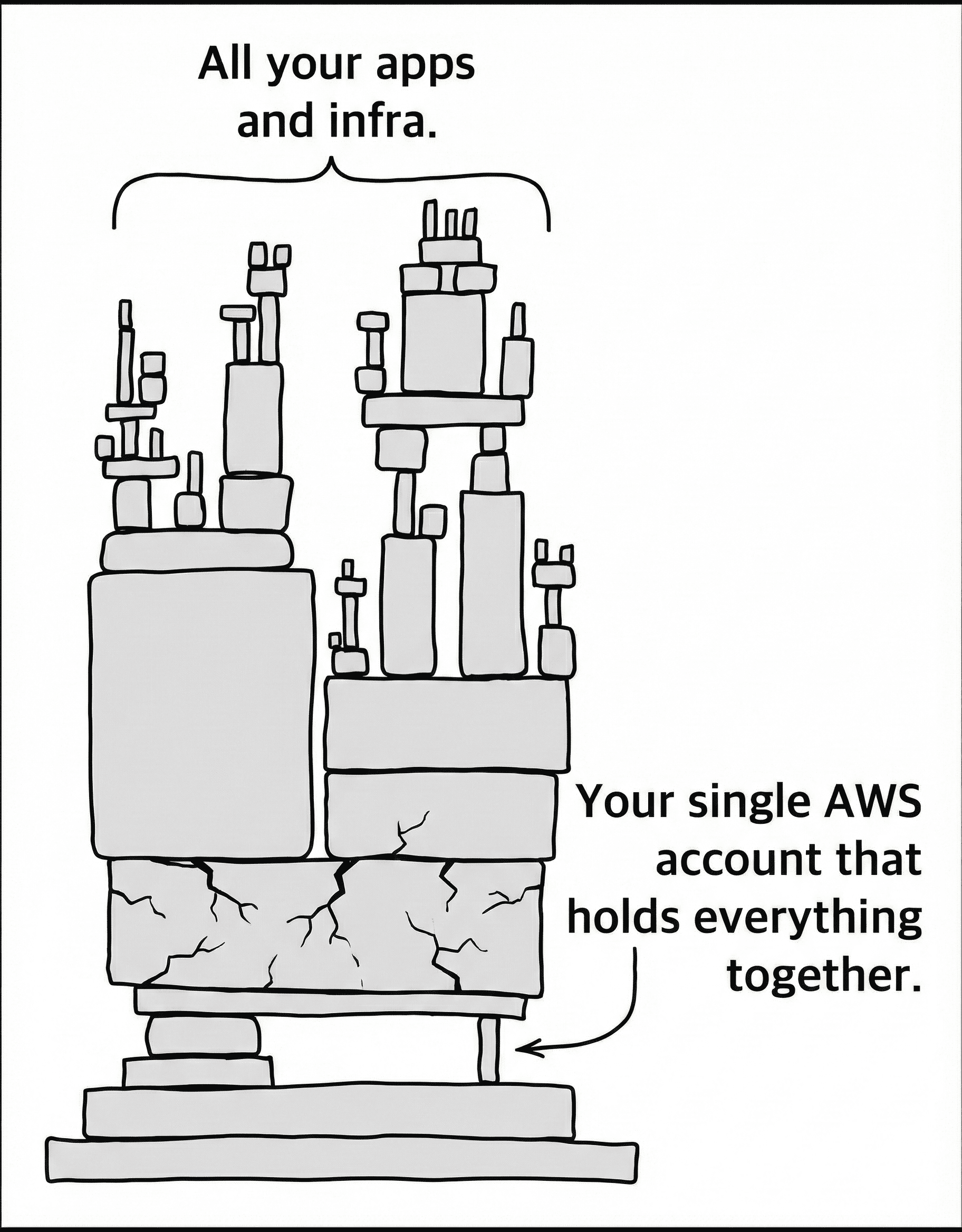
AWS account that holds everything together

One mistake can take down everything

Without account separation, a bug in dev can break production and a compromise in one workload affects every other workload sharing the same boundary.

Service limits become a delivery constraint

Single-account growth pushes against quotas, policy sprawl, and manual setup. The AWS model that worked early starts slowing every new launch.

Cost ownership gets blurry

When teams, projects, and environments share the same account structure, cost allocation and optimization work both get harder.

Security and compliance become manual work

The same environment has to satisfy different controls for different workloads, which leads to fragile guardrails and audit pain.

IAM becomes harder to reason about

Permissions, account access, and cross-team boundaries turn into a web of exceptions that are difficult to review and harder to maintain safely.

How we fix it

See the foundation before it lands in your AWS organization.

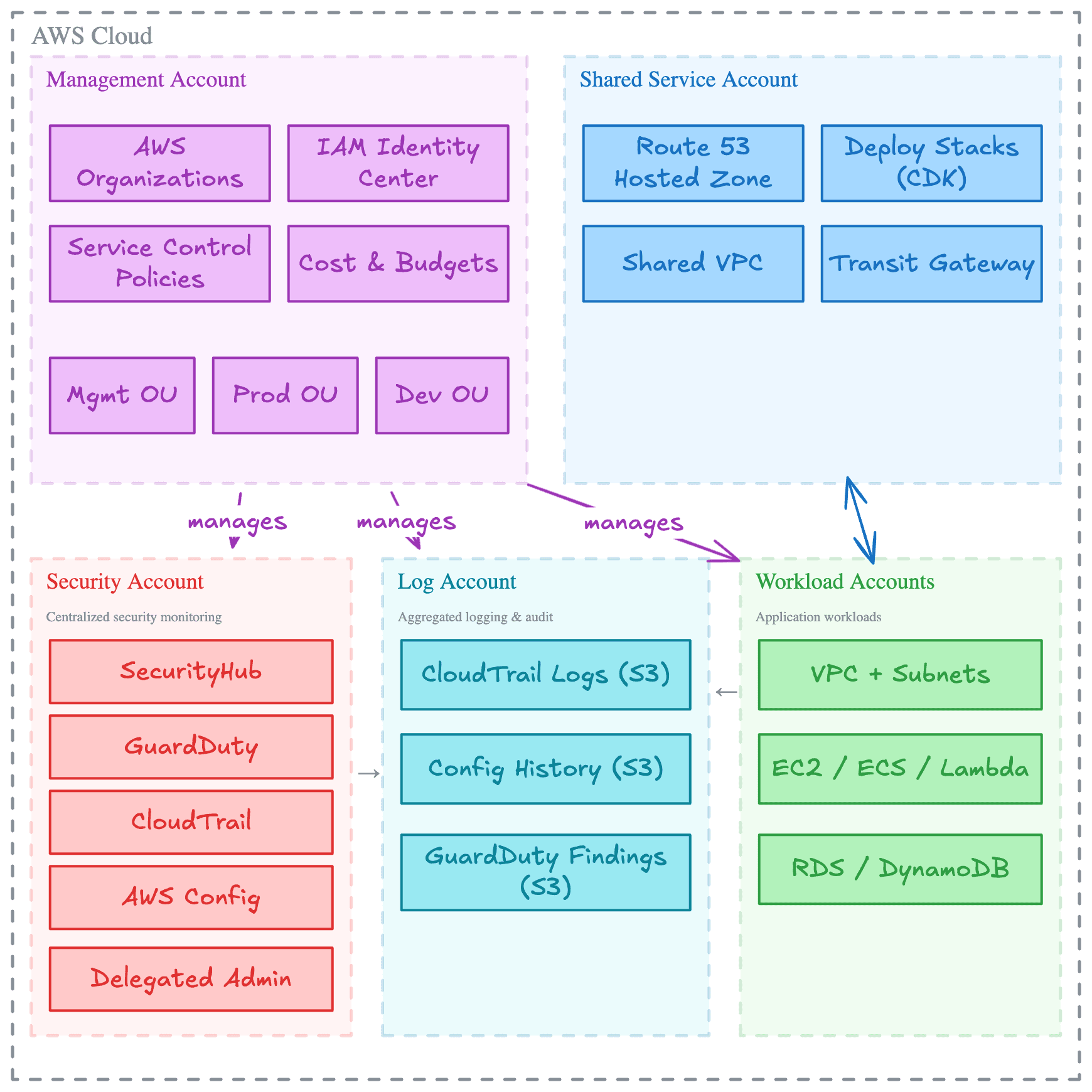
The landing zone is opinionated where it should be and adaptable where teams need room. Review the organization model, the security fabric, the infrastructure code structure, and the built-in controls before deciding whether the baseline fits your AWS operating model.

Organization Structure

Multi-Account Architecture

A well-architected AWS Organization structure with dedicated Management, Production, and Development Organizational Units (OUs). We separate accounts for critical functions like Security, Audit/Logging, and Shared Services following AWS best practices.
Dedicated Security Accounts
Log Archive Centralization
Workload Isolation

Every feature you need, right out of the box

From automated account provisioning to enterprise-grade security and compliance monitoring, our CDK Landing Zone includes everything you need to run production workloads with confidence on AWS Cloud. Explore the table below for a comprehensive list of all included features.

Security & Compliance

Centralized Root User Management
Enables centralized root user management and securely deletes all member account root users, reducing security risks and ensuring proper access control across the organization.
Enable EBS Encryption
Automatically enables encryption for all new EBS volumes in the account using a custom resource to enforce a secure-by-default storage policy.
S3 Block Public Access
Applies account-level S3 public access block settings to prevent accidental public exposure of S3 buckets and data.
Encrypted SNS Topic
Creates an SNS topic with encryption backed by a KMS key and tailored access policies to secure notification data and control subscriber access.
Set Account Password Policy
Enforces a robust IAM password policy with requirements like minimum length, expiration, reuse prevention, and complexity rules, thereby strengthening overall account security.
Secure Defaults
Applies security best practices by enforcing secure defaults. For global accounts, it blocks public S3 access and sets a strict account password policy; for regional deployments, it removes the default VPC, enables EBS encryption by default, and secures new VPCs' default security groups.
GuardDuty Deployment
Deploys Amazon GuardDuty with dual options: either enabling a delegated administrator account for centralized management or auto-configuring GuardDuty detectors along with organizational settings to automatically enable GuardDuty for all members.
CloudTrail Logging
Centralizes AWS CloudTrail logs and sets up CloudWatch alarms for key security events (such as unauthorized access and root-user activity) to enhance security monitoring.
Configuration Recorder
Captures and delivers AWS Config snapshots, enabling continuous tracking of configuration changes and ensuring compliance across environments.
Security Hub Management
Centralizes AWS Security Hub configuration across the organization by deploying aggregators, establishing organization-wide configuration policies for enabled and disabled standards, and associating these policies with the relevant organizational units.
AWS Config
Deploys AWS Config recording with integration to existing log archive and security accounts. It imports an SNS topic for notifications as well as an S3 bucket for storing AWS Config logs, ensuring that configuration changes and compliance events are centrally recorded and alerted upon.
Log Archive
Sets up a centralized logging architecture for both CloudTrail and AWS Config. This stackset provisions secure S3 buckets with access logs, lifecycle rules, and proper bucket policies to ensure compliance and effective log retention across the organization.
Centralized Alerts
Establishes centralized, encrypted SNS topics for alerting. It sets up topics for CloudTrail and AWS Config notifications, applying organization-based access controls and allowing the security team to receive timely alerts via email.

Automated Account Provisioning

CDK Bootstrap Stackset
Provisions the core bootstrap resources needed for CDK deployments. This includes an encrypted and versioned S3 bucket for file assets, an ECR repository for container images with automated image scanning and lifecycle rules, and preconfigured IAM roles.
Set Alternate Contact
Automatically configures alternate contacts (security, billing, operations) for new AWS accounts, ensuring that proper notifications and account management are in place.
Unsubscribe Marketing Mails
Automatically opts out new AWS accounts from receiving AWS marketing emails, helping maintain desired email preferences across the organization.
Close Account
Automates the closure of AWS accounts when they are moved to a suspended organizational unit, reducing manual intervention and mistakes.
Delete Default VPC
Removes the default VPC in newly created regions using a custom resource and Lambda, helping maintain a clean and secure AWS environment by eliminating unused resources.

Operations & Cost Optimizations

Cost Anomaly Monitoring
Detects unusual cost patterns across AWS services and sends immediate SNS notifications to ensure cost overruns are quickly addressed.
Budget Alerts
Sets up cost budgets with notifications for actual and forecasted spending that exceed defined thresholds, allowing proactive budget management.
Increase Service Quota
Automates requests for AWS service quota increases via a custom resource, ensuring resources are available as demand grows.

Infrastructure & Deployment

Detect StackSet Drift
Regularly checks for drift in CloudFormation StackSets using a scheduled Lambda function, maintaining the desired configuration state across your account.
GitHub Actions Pipeline
Provides a secure CI/CD pipeline using GitHub Actions to automatically deploy your infrastructure changes to AWS. Uses OIDC authentication for secure, credential-free deployments without storing long-lived AWS access keys.
AWS Organizations via Code
Create new AWS accounts, define organizational units, and apply Service Control Policies (SCPs) programmatically via AWS CDK, ensuring consistent governance across your entire organization.

Check out our roadmap to see what we're building next.

What we deploy when the root cause is structural

AWS Landing Zone Deployment

A CIS-compliant, multi-account AWS foundation built with AWS CDK. We migrate existing accounts into the framework so security guardrails, logging, identity, and account provisioning become automated instead of manual platform upkeep.

What's included

SOC 2 ready in a week*
Multi-account architecture
24/7 automated threat detection
Centralized security dashboard
Centralized audit logging
Account security hardening
Automated account provisioning
AWS Organizations managed via code
Cost anomaly detection & budget alerts
CI/CD pipeline with GitHub Actions
No vendor lock-in
AWS Single Sign On

* Compliance scores apply to the AWS foundation layer: organization, accounts, networking, and security services. Existing workload infrastructure may need separate remediation.

Scoped after assessment

Built when the assessment shows the foundation needs work.

We recommend it when account boundaries, IAM, logging, guardrails, compliance evidence, and platform maintenance keep slowing the team down or creating avoidable risk.

Deployment pricing is scoped after we understand the environment, account model, migration constraints, and the amount of remediation needed around the workloads.

Proof from shipped work

A stronger AWS foundation changes both delivery speed and security posture.

The value is not just the initial deployment. It is the baseline the team inherits afterward: cleaner account boundaries, faster account creation, and a foundation that is easier to evolve.

Before Towards the Cloud, we received a variety of proposals to provision our AWS landing zone. Danny's solution and AWS expertise stood out with comprehensive accelerators, documentation, and clearly articulated design principles. We achieved a perfect security score in days, not months, and TTC's ongoing support has been invaluable.
Galen Simmons, Founder of Accolade
Galen Simmons
CEO & Founder, Accolade
Read the Accolade case study
1 week
Typical deployment window for a production-ready AWS foundation
100%
Minutes
To provision new secure accounts after the baseline is in place
18+
Ready-to-deploy stacksets covering security, compliance, and account setup
How the deployment runs

From AWS sprawl to a cleaner multi-account operating model

The process is intentionally short: define the right boundary model, deploy the landing zone, then leave the team with a baseline it can keep operating after the initial rollout.

Step 1

Kickoff and boundary design

We review the current AWS organization, the compliance targets, and the account model your team needs before finalizing the landing-zone scope.

Requirement captureTarget account modelAccess and rollout plan
Step 2

Landing-zone deployment and migration

We deploy the landing zone, configure the guardrails, and bring existing accounts into the new structure while minimizing disruption to the workloads already running.

Landing-zone deploymentGuardrail configurationAccount migration path
Step 3

Handover and operating model

We walk the team through the deployed baseline, the security posture, and the codebase so the landing zone remains understandable after delivery instead of turning into another opaque platform layer.

CDK codebase handoverPipeline walkthroughSecurity posture review

Run it with your team

Take ownership of the CDK codebase, the deployment flow, and the operating model after the handover is complete.

  • Full CDK codebase in your repository
  • Knowledge transfer session
  • No platform lock-in
Book a free intro call

Keep us involved

Use the landing zone as the baseline and keep us on for updates, feature expansion, and ongoing security or platform work as the AWS estate grows.

  • Landing zone maintenance
  • Security and feature updates
  • Additional platform support options
View service tiers

Get the AWS Landing Zone through AWS Marketplace

Purchase the landing zone deployment through AWS Marketplace when procurement or billing needs to stay inside your AWS vendor workflow.

After the foundation is live

Manage it yourself, or let us keep it current

After deployment, you can run the foundation with your own team or keep us involved for maintenance, updates, security visibility, cost automation, and hands-on engineering support. The goal is to remove AWS platform upkeep from your developers so they can build on top of AWS faster and more securely.

Essentials

Platform Maintenance

Landing Zone Security Updates
Included
Landing Zone Feature Updates
Included
CDK Construct Library
Included
Feature Roadmap Requests
Included

Security & Cost Visibility

Cloud Security Posture Dashboard
Not included
FinOps Automation (OpenOps)
Not included

Support & Engineering

Support Channel
GitHub Issues
Cloud Engineer Retainer
Not included
CDK Construct Development
Not included
Hands-on Training (Workshops)
Not included

Growth

Platform Maintenance

Landing Zone Security Updates
Included
Landing Zone Feature Updates
Included
CDK Construct Library
Included
Feature Roadmap Requests
Included

Security & Cost Visibility

Cloud Security Posture Dashboard
Included
FinOps Automation (OpenOps)
Included

Support & Engineering

Support Channel
Slack (24h)
Cloud Engineer Retainer
8h/month
CDK Construct Development
Not included
Hands-on Training (Workshops)
Not included

Scale

Platform Maintenance

Landing Zone Security Updates
Included
Landing Zone Feature Updates
Priority Access
CDK Construct Library
Included
Feature Roadmap Requests
Included

Security & Cost Visibility

Cloud Security Posture Dashboard
Included
FinOps Automation (OpenOps)
Included

Support & Engineering

Support Channel
Slack (12h)
Cloud Engineer Retainer
Custom hours
CDK Construct Development
Included
Hands-on Training (Workshops)
Included
Landing zone FAQ

Questions teams ask
before changing the AWS foundation

How is this different from AWS Control Tower?

Our Landing Zone is GitOps-first and ships with security and compliance baselines already configured. Control Tower still requires a lot of manual follow-up in the console to achieve the same posture. With our implementation, your infrastructure is version-controlled in CDK, changes flow through pull requests and CI/CD, and every account is compliant from the moment it is provisioned.

Will this disrupt our existing workloads?

No. We attach the Landing Zone to your existing AWS Organization and migrate accounts into the new structure without downtime. Your workloads keep running while we roll out guardrails gradually. Developers continue building with the tools they already know while the foundation improves around them.

How long does the deployment take?

We start with a kickoff call (up to 2 hours) to gather requirements and discuss access. From there, the core Landing Zone is typically deployed within one week. The final handover and knowledge transfer session follows shortly after, so your team is confident operating it independently.

Do we need to pause development during deployment?

No. Your developers keep shipping while we work in parallel. The Landing Zone is deployed alongside your existing setup, and accounts are migrated without affecting running services. There is no freeze window and no downtime.

What if we need changes after deployment?

The entire Landing Zone is built with native AWS CDK and lives in your GitHub repository. Your team can modify OU structures, Service Control Policies, security controls, and account configurations through pull requests. The architecture scales to hundreds of accounts, so it grows with you. If you want our help, our ongoing service tiers include a cloud engineer retainer for exactly this.

What happens if something goes wrong after handover?

If you are on one of our ongoing service tiers, we are available via Slack or GitHub Issues depending on your plan. If you chose to self-manage, you still own the full codebase and documentation. Any AWS engineer familiar with CDK can troubleshoot and resolve issues. The Landing Zone uses standard AWS services, so there is nothing proprietary that could block you.

What does the pricing look like?

Landing Zone deployment is scoped after the free intro call and, where needed, an AWS Foundation Assessment. The assessment clarifies the account model, migration constraints, security controls, and amount of workload remediation before we quote the build. Optional ongoing support starts from $399/month after the foundation is live. See the support comparison for the tier breakdown.

Book the free intro call

Ready to replace account sprawl with a cleaner AWS baseline?

The first meeting is free. We'll review the current AWS organization, the controls you need, and whether the landing zone is the right next move before migration or broader platform work begins.

Multi-account design workshopCDK-based landing zone deliveryOptional ongoing platform support

Not the right starting point? Explore our other AWS Professional Services or start with the Well-Architected Review when you need a broader assessment first.