In this article, you'll learn how you can find your AWS account ID and account name quickly using two simple methods. One way is to get the account information via the AWS Console. The other way is to get it via the AWS CLI.
Your AWS account ID is a unique 12-digit identification number that is assigned to your AWS account. The account name is a human-readable identifier that helps you distinguish between multiple AWS accounts. Both are important for you to track your account information with AWS.
To find your AWS account id with the AWS CLI, run the command sts get-caller-identity and it will return the 12-digit identification number of your AWS account. To find your AWS account name with the AWS CLI, run the command aws account get-account-information to retrieve the account name.
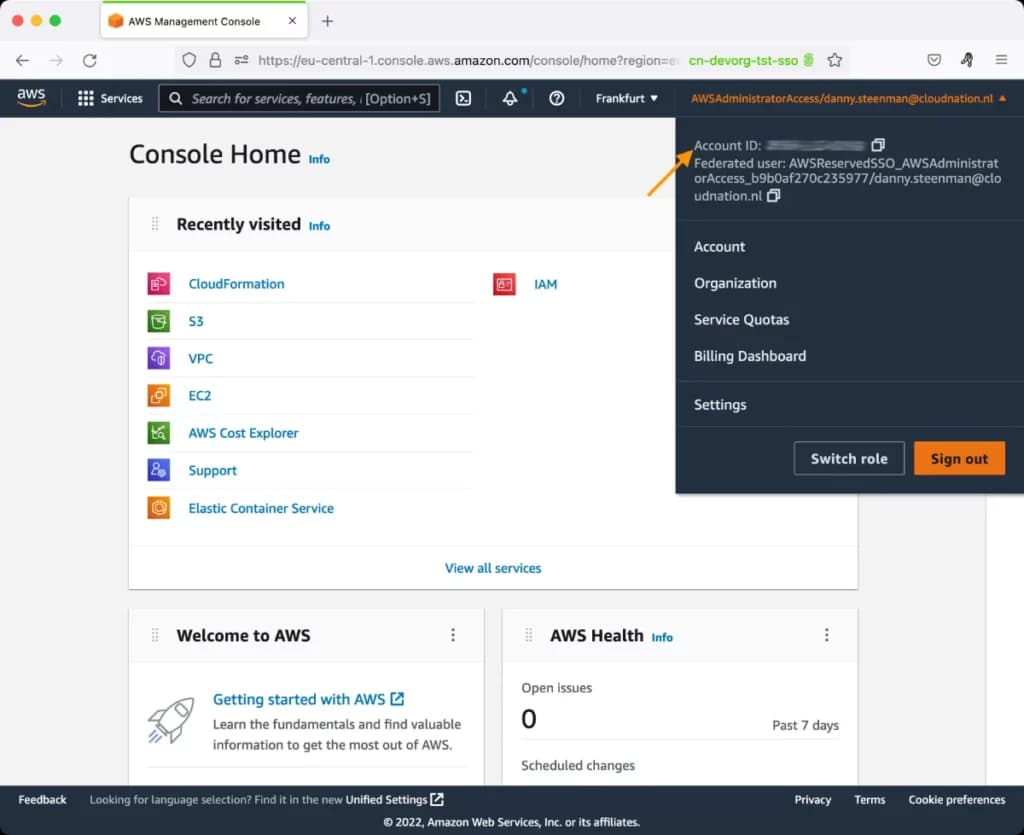
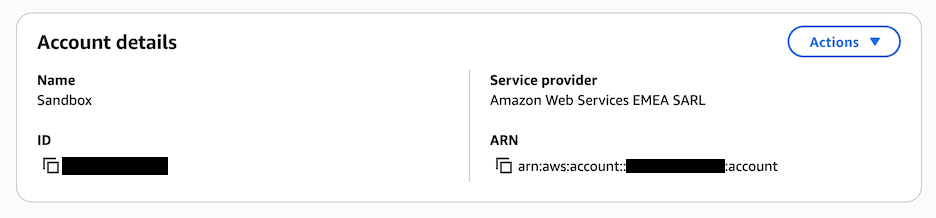
To find your AWS account id in the AWS Console, click on your role name in the top right corner to view the account ID. To find your AWS account name in the AWS Console, click on your role name in the top right corner to view both the account ID and account name together.
Here are the detailed steps to find your AWS account ID and account name in the AWS Console and AWS CLI.
Using the AWS CLI
Before you can get your AWS account information using the AWS CLI, make sure to log in to the specified AWS CLI profile. Otherwise, you can't run any AWS CLI commands on your AWS account.
Get your AWS Account ID
To get your AWS account id with the AWS CLI you run the following command:
aws sts get-caller-identity --query 'Account' --output text
This will return your 12-digit identification number in plain text.
~ on tst-account-sso (eu-central-1) [59m25s]
➜ aws sts get-caller-identity --query 'Account' --output text
123456789012
Get your AWS Account Name
Now that you have the account ID, you might also want to know the account name. To get your AWS account name with the AWS CLI, run the following command:
aws account get-account-information
This will return your account information including the account name, account ID, and creation date:
{
    "AccountCreatedDate": "2025-06-23T19:03:50+00:00",
    "AccountId": "123456789012",
    "AccountName": "Sandbox"
}
Note: To run this command, your IAM user or IAM role must have the account:GetAccountInformation permission.
If you manage multiple AWS accounts within an organization and need to list all accounts by their organizational unit, check out our guide on how to list AWS accounts by organizational unit name.
Using the AWS Console
Get your AWS Account ID
To get your AWS account ID via the AWS Console, follow these 3 steps:
- Sign in to the AWS Console with your credentials.
- Click on your IAM user/role on the top right corner of the AWS Console
- You'll see a dropdown menu containing the AWS Account ID
Get your AWS Account Name
Now that you have the account ID, you might also want to know the account name. To get your AWS account name via the AWS Console, follow these steps:
- Sign in to the AWS Console with your credentials.
- Click on your IAM user/role on the top right corner of the AWS Console
- Click on "Account" in the dropdown menu
- This will take you to the Billing and Cost Management page where you'll see all your account details including the account name, account ID, ARN, and service provider
Conclusion
There are multiple methods available that allow you to find your AWS Account ID and account name quickly. Via the AWS CLI, you can run the aws sts get-caller-identity command to immediately get the AWS Account ID, and use aws account get-account-information to retrieve the account name.
If you prefer using the AWS Console, you can easily find the AWS Account ID in the dropdown menu by clicking your role in the top right corner. To get the full account details including the account name, click on "Account" in that same dropdown, which takes you to the Account page showing all your account information.
Having quick access to both your account ID and account name is essential for managing multiple AWS accounts, setting up cross-account access, and maintaining clear account identification across your organization.