AWS CDK, the AWS Cloud Development Kit, is an open-source framework for defining AWS infrastructure in code, in TypeScript, Python, Java, C#, Go, or JavaScript, then deploying it through AWS CloudFormation. Instead of hand-writing declarative JSON or YAML, you write a program that generates it for you.
For years, two tools dominated Infrastructure as Code on AWS: CloudFormation and Terraform, both declarative, both requiring you to describe your desired end state in a template rather than code. Declarative templates get unwieldy fast. A production stack easily grows to thousands of lines, and you lose access to loops, conditionals, and the object-oriented patterns that keep application code manageable. CDK closes that gap: a real programming language on top, CloudFormation underneath.
By the end, you'll know CDK's core building blocks, whether it's still worth building on in 2026, when it fits (and when it doesn't), and how it stacks up against CloudFormation, the AWS SDK, and Terraform, tradeoffs included.
What Is the AWS Cloud Development Kit (CDK)?
AWS CDK is an open-source software framework: you write code, CDK synthesizes it into a CloudFormation template, and CloudFormation provisions the actual resources. AWS released the first public beta (v0.8.0) in 2018 as a TypeScript-first alternative to hand-written CloudFormation.
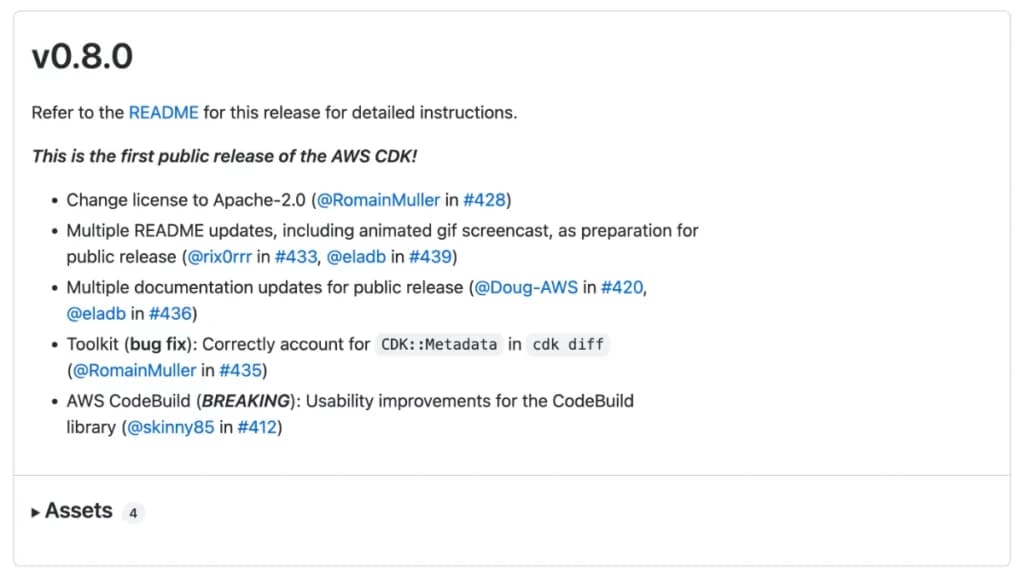
First public beta release of AWS CDK
AWS open-sourced the project from the start, so the community could contribute constructs and file issues directly against the maintainers. CDK v2 became generally available in December 2021; v1 entered maintenance on June 1, 2022, and reached end of support on June 1, 2023. If you're starting fresh, v2 is the only version worth using.
Supported Programming Languages
CDK supports six languages so you can build with what your team already knows: TypeScript, JavaScript, Python, Java, C#/.NET, and Go. All six compile through the same jsii engine, which is why every CDK app, regardless of language, still needs Node.js underneath.
Go deserves a caveat. The current CDK Developer Guide describes it as fully supported and stable, no different from the other five. The official CDK FAQ and AWS's Cloud Essentials page still call it "Developer Preview," a genuine conflict this guide won't paper over. The Developer Guide is more specific and more recently maintained, so treat it as current, but don't be surprised to see the older language elsewhere on aws.amazon.com.
How AWS CDK Works
Four phases turn your CDK code into running infrastructure:
1. Development: you write CDK code, defining infrastructure with constructs from the Construct Library.
2. Synthesis: cdk synth executes your app and generates a CloudFormation template per stack, saved as a cloud assembly in cdk.out.
3. Bootstrapping (one-time): each AWS environment (account plus region) must be bootstrapped before its first deployment, creating the S3 bucket, ECR repository, IAM roles, and SSM parameter CDK needs.
4. Deployment: cdk deploy uploads assets, submits the CloudFormation template, and CloudFormation provisions your resources.
Building custom CI/CD tooling around CDK? The CDK Toolkit Library (@aws-cdk/toolkit-lib), GA since May 2025, exposes the same actions as a programmatic Node.js API instead of shelling out to the CLI.
Is AWS CDK Still Actively Developed?
If you've searched "is AWS CDK deprecated," here's the direct answer: no. CDK ships on an approximately weekly release cadence, and the CLI and the Construct Library (aws-cdk-lib) now version independently, so their numbers no longer track each other. At the time of writing, aws-cdk-lib is at 2.262.2 and the CDK CLI (aws-cdk) is at 2.1133.0; run npm view aws-cdk-lib version before you rely on either number, since new releases ship every few days.
That gap isn't neglect, it's a deliberate consequence of decoupling their release cycles, and AWS documents that running a newer CLI against an older, still-supported aws-cdk-lib is always safe.
Recent releases back that up:
- CDK Toolkit Library (
@aws-cdk/toolkit-lib), GA in May 2025: a programmatic Node.js API for synth, deploy, diff, and rollback, for teams building custom deployment tooling instead of the CLI. - CDK Refactor, in preview since September 2025: a first attempt at renaming or moving constructs without triggering a CloudFormation resource replacement (more on why that matters in the section on why teams leave for Terraform).
- CDK Mixins, GA in March 2026: composable feature abstractions you can attach to L1, L2, or custom constructs via
.with(), instead of writing a bespoke L2 subclass for every variation. - CLI commands that didn't exist when CDK v2 first shipped:
cdk migrate,cdk import,cdk gc,cdk drift, andcdk flags. - The bootstrap template has moved from v9 to its current v32 since 2022, adding permissions for new CLI features and closing several security gaps along the way.
None of that reads like a project on life support: a tool AWS keeps shipping against, worth knowing before you build a multi-year platform on it.
Core Concepts: Constructs, Stacks, and Apps
AWS CDK is built on three building blocks that compose hierarchically: constructs, stacks, and apps. Get comfortable with how they nest, and the rest of CDK gets a lot more predictable.
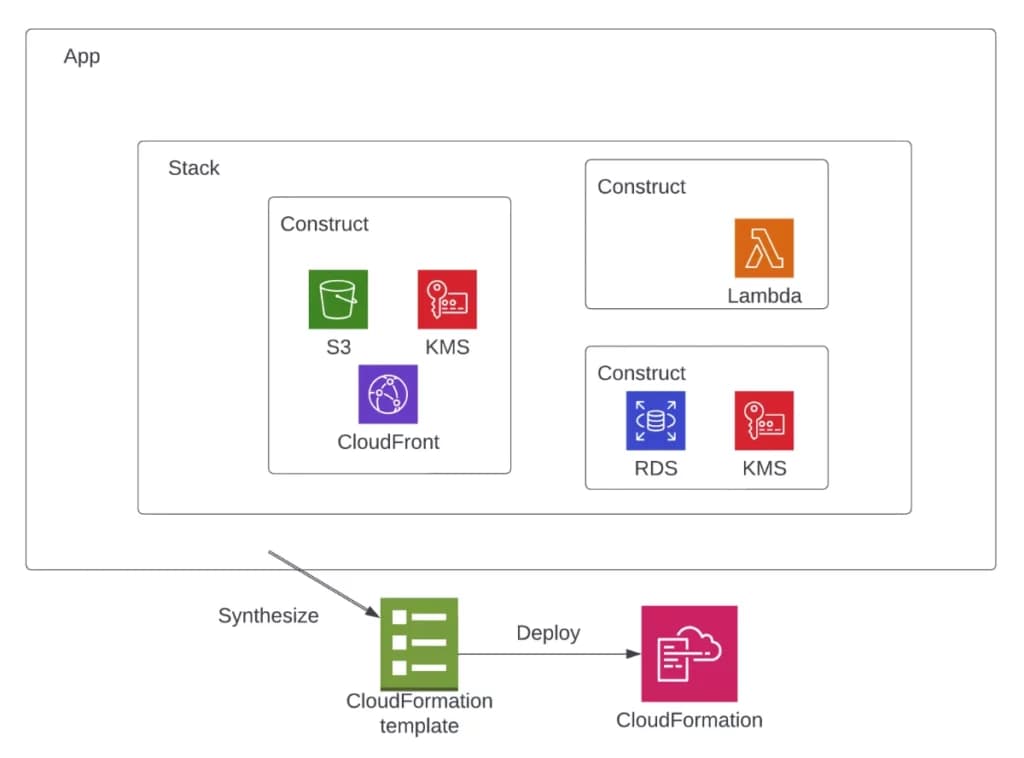
AWS CDK Concept architecture diagram
The Three Levels of Constructs
Constructs represent one or more CloudFormation resources plus their configuration. CDK organizes them into three levels of abstraction:
L1 constructs (CfnBucket, CfnFunction) map directly to a single CloudFormation resource, auto-generated from the spec on every release. Reach for them, or the escape hatches exposed from higher-level constructs, when you need a property L2 doesn't surface yet.
L2 constructs are what you'll use for most resources: an intent-based API over the same CloudFormation resource, with sensible defaults and built-in security practices, like bucket.grantRead(role) generating a least-privilege IAM policy instead of hand-written JSON.
L3 constructs (patterns) bundle several resources into a working solution. ApplicationLoadBalancedFargateService is the classic example: one construct, and you get a cluster, service, load balancer, security groups, and IAM roles together.
Newer still: CDK Mixins, GA since March 2026, attach composable feature abstractions to any construct, L1, L2, or custom, via .with(), instead of a bespoke L2 subclass per variation. See our dedicated guide to CDK constructs for the full breakdown.
Stacks
A CDK stack is a deployable unit: everything inside it deploys, updates, and rolls back together as one CloudFormation stack. Group resources by deployment boundary, not by service type, and keep stateful resources like databases in their own stack so a bad API deploy can't touch them. See our complete guide to CDK stacks for nested stacks and cross-stack references.
Apps and Composition
A CDK App is the top-level container for one or more stacks; synthesizing it produces templates for everything inside. Composition, building your own constructs from lower-level ones, is how you turn a one-off configuration into a reusable, organization-wide pattern.
Should You Use AWS CDK?
CDK is a strong default for AWS-native teams, but it's not the right tool for every job. Use the framework below instead of taking that as a given.
When to Use AWS CDK
CDK earns its keep when:
- You're combining multiple services in one app (API Gateway + Lambda + DynamoDB, or ECS + RDS + ElastiCache)
- Your team wants to standardize patterns across projects through a shared, versioned construct library
- Your infrastructure needs real logic, loops, conditionals, computed values, that gets awkward in a declarative template
- You want infrastructure changes to go through the same code review and unit tests as application code
- You're deploying the same stack to dev, test, and prod with per-environment configuration
When NOT to Use AWS CDK
Reach for something else when:
- You're deploying a handful of simple resources where a CDK app is more setup than the problem needs
- Your team is more comfortable with templates than with TypeScript or Python, and has no reason to change
- You need multi-cloud support; CDK only deploys to AWS (Terraform is worth a look)
- Your organization has already standardized on another IaC tool and switching cost outweighs the benefit
CDK inherits CloudFormation's operational quirks along with its benefits. The section on why teams leave for Terraform below covers what that means in practice.
AWS CDK vs Other AWS & IaC Tools
CDK doesn't exist in isolation. Here's how it stacks up against the tools you're actually choosing between: CloudFormation (what it compiles to), the AWS SDK (often confused with it), and Terraform (the main alternative outside the AWS ecosystem).
CDK vs CloudFormation
CDK generates CloudFormation templates under the hood, so both share the same deployment engine, rollback behavior, and drift detection. The difference is entirely in developer experience: JSON/YAML templates versus a full programming language, with L1, L2, and L3 constructs providing the sensible defaults and reusability plain CloudFormation makes you write by hand.
Fewer lines of code doesn't mean less to maintain, and CDK doesn't replace CloudFormation, it authors it. Validate what it synthesizes with cfn-lint and checkov before it ships. For the bootstrap tax, the feature-lag objection, the portability trap, and the full verdict on when plain CloudFormation still wins, read our dedicated AWS CDK vs CloudFormation guide.
CDK vs AWS SDK
The CDK and the AWS SDK solve different problems, but the acronyms get confused constantly. The distinction comes down to timing:
| Aspect | AWS SDK | AWS CDK |
|---|---|---|
| Runs | At runtime, inside your application | At deploy time, before your app runs |
| Does | Calls AWS APIs against resources that already exist | Defines and provisions the resources themselves |
| Output | API responses your code consumes | A CloudFormation template |
Rule of thumb: CDK builds your infrastructure, the SDK talks to it once it exists. They're complementary, not competing. A typical serverless app uses CDK to provision a Lambda function and an SDK client inside that function to write to DynamoDB.
CDK vs Terraform
Terraform is CDK's main competitor outside AWS: it provisions across any cloud provider using HCL, while CDK stays AWS-only but gives you a full programming language. For provisioning speed, state management, and a migration path, read our dedicated AWS CDK vs Terraform guide.
Two things worth knowing. Terraform moved off the open-source Mozilla Public License to the more restrictive Business Source License in August 2023, pushing some teams toward alternatives. One of those, CDK for Terraform (CDKTF), combined CDK-style constructs with Terraform's provider ecosystem; HashiCorp has since deprecated it, so it's not a path for new work. For multi-cloud with a real programming language, Pulumi is where most teams land instead, with 50-plus providers across TypeScript, Python, Go, Java, and more.
Why Teams Move From AWS CDK to Terraform
Teams that run CDK in production for a few years tend to hit the same handful of pain points before they consider switching. None are secret, and each has a workable mitigation once you know it's coming.
The deadly embrace. When one stack exports a value that another imports via Fn::ImportValue, CloudFormation blocks you from deleting or modifying the exporting resource while any consumer still imports it. The fix isn't a single deploy: weaken the cross-stack reference first (move the consumer off Fn::ImportValue, or use the older two-deploy exportValue() pattern), deploy that, then remove the resource.
CDK inherits CloudFormation's failure modes. A console edit or stray CLI command outside CDK can break your next deploy. Run cdk diff first, and use cdk drift, a dedicated drift-detection command, though not every resource type supports it yet.
New services often ship with L1 only. L2 constructs can lag a new service by months. Drop to L1, or an escape hatch from an existing L2, rather than waiting.
Renaming or moving a construct can replace the resource. CDK derives a logical ID from a construct's position in the tree. Move or rename it, and CloudFormation reads that as delete-and-recreate, destructive for anything stateful like an S3 bucket or RDS instance. cdk diff is the standard defense. CDK Refactor, in preview since September 2025, is the first tool built to move or rename constructs without triggering replacement, though it's still a preview feature, not a guarantee yet.
None of this rules CDK out. It means budgeting for CloudFormation's operational quirks as part of the decision, instead of discovering them six months into a production workload.
Real-World Use Cases and Examples
Three examples show where CDK's abstraction actually pays off, from a single resource to a full container platform.
Serverless API Example
Here's a simple S3 bucket with versioning enabled:
import * as s3 from 'aws-cdk-lib/aws-s3';

new s3.Bucket(this, 'MyFirstBucket', {
  versioned: true,
  encryption: s3.BucketEncryption.S3_MANAGED
});
For a complete walkthrough, see our guide on setting up an S3 bucket with AWS CDK. You can also learn how to assign IAM roles to Lambda functions for building secure serverless APIs.
Container Workloads
L3 patterns shine when deploying container workloads. This example creates a complete Fargate service with load balancer:
import * as ec2 from 'aws-cdk-lib/aws-ec2';
import * as ecs from 'aws-cdk-lib/aws-ecs';
import * as ecs_patterns from 'aws-cdk-lib/aws-ecs-patterns';

const vpc = new ec2.Vpc(this, "MyVpc", {
  maxAzs: 3
});

const cluster = new ecs.Cluster(this, "MyCluster", {
  vpc: vpc
});

new ecs_patterns.ApplicationLoadBalancedFargateService(this, "MyFargateService", {
  cluster: cluster,
  cpu: 512,
  desiredCount: 6,
  taskImageOptions: {
    image: ecs.ContainerImage.fromRegistry("amazon/amazon-ecs-sample")
  },
  memoryLimitMiB: 2048,
  publicLoadBalancer: true
});
This single construct creates a VPC across 3 availability zones, an ECS cluster, a 6-task Fargate service, a load balancer, security groups, and IAM roles. See our Application Load Balanced Fargate Service and Scheduled Fargate Task tutorials for the details.
Multi-Environment Deployments
CDK makes deploying the same stack to multiple environments straightforward: pass environment-specific configuration through context or props rather than duplicating stack definitions.
const app = new cdk.App();

new MyStack(app, 'Dev', {
  env: { account: '111111111111', region: 'us-east-1' },
  instanceSize: 'small'
});

new MyStack(app, 'Prod', {
  env: { account: '222222222222', region: 'us-east-1' },
  instanceSize: 'large'
});
See share resources across stacks for the multi-stack version of this pattern, and the complete guide to CDK stacks for the fundamentals.
Getting Started with AWS CDK
Install the CLI, bootstrap your account, and you're a cdk deploy away from a working stack.
Prerequisites and Installation
To install the AWS CDK toolkit on your machine, use the node package manager:
npm install -g aws-cdk
CDK needs Node.js underneath every supported language, not just TypeScript and JavaScript. Use Node.js 22.x or later for new setups (20.x is supported only until October 2026). You'll also need the AWS CLI configured with credentials, plus your preferred language runtime if you're not using TypeScript or JavaScript.
Bootstrapping Your AWS Environment
Before your first deployment, you must bootstrap your AWS environment. This one-time setup per account and region creates the resources CDK needs for deployments:
cdk bootstrap aws://ACCOUNT-NUMBER/REGION
This creates an S3 bucket for file assets, an ECR repository for Docker images, a set of IAM roles for deployments, and an SSM parameter tracking the bootstrap version, currently at v32. Skip this step and you'll get an explicit error: "SSM parameter /cdk-bootstrap/hnb659fds/version not found."
One security note worth taking seriously: --trust <ACCOUNT> --cloudformation-execution-policies <POLICY_ARN> grants that account the permissions implied by the execution policy, commonly AdministratorAccess in AWS's own examples. Keep the trusted-account list tight, and always pass the full list when re-running --trust; passing only new accounts silently drops the ones you trusted before.
Excalidraw diagram loading.
Your First CDK Application
Create a new CDK project:
mkdir my-cdk-app && cd my-cdk-app
cdk init app --language typescript
This scaffolds a complete CDK project. Edit lib/my-cdk-app-stack.ts to add your resources, then:
cdk synth    # Generate CloudFormation template
cdk diff     # Preview changes before deploying
cdk deploy   # Deploy to AWS
For organizing larger projects, see our guide on optimizing your CDK project structure.
Production-Ready Starter Kit
Want to skip the boilerplate? The AWS CDK Starter Kit is a TypeScript template with secure OIDC authentication, automated CI/CD, and branch-based deployments, built from best practices and a secure GitHub Actions pipeline.
See the AWS CDK Starter Kit documentation for setup instructions.
CDK Ecosystem and Resources
The CDK ecosystem extends well beyond the core library.
Construct Hub
Construct Hub is the registry for AWS-authored, partner, and community CDK constructs, auto-populated from npm within 5 to 10 minutes of publish. Check it before building something from scratch, and consider publishing your own constructs once you have something worth sharing.
Developer Tools
A few tools worth adding to your setup: the AWS Toolkit for VS Code for a tree view of your CDK app, cdk-nag to check constructs against AWS Solutions, HIPAA, and NIST rule packs during synthesis, and the CDK Construct Snippets extension for faster autocomplete.
AWS CDK Best Practices
A few practices matter specifically at the level this guide operates: model your infrastructure with constructs, but treat stacks purely as deployment boundaries, and run cdk diff before every deploy so nothing reaches production unreviewed. Keep stateful resources like databases in their own stack, separate from the stateless compute and API layers that change more often.
That covers the essentials. For the complete production checklist, Projen setup, testing strategy, cdk-nag compliance packs, and CI/CD pipeline design, see our complete guide to AWS CDK best practices. The official AWS best practices guide is worth bookmarking too.
Troubleshooting Common CDK Issues
Most CDK errors you'll hit are CloudFormation errors wearing a CDK CLI message. Once you internalize that, troubleshooting gets more direct: check the CloudFormation event history for the actual failure, not just the CDK CLI output.
The one error nearly everyone hits early:
--app is required either in command-line, in cdk.json or in ~/.cdk.json
This happens when you run a cdk command outside your project's root. Fix it by running cdk init, cdk synth, or cdk deploy from the directory that contains cdk.json, alongside your app's entry point.
For deployed resources that seem to have drifted from your code, cdk drift checks whether anything changed outside CloudFormation, a console edit or a stray aws CLI call. For a stack stuck in UPDATE_ROLLBACK_FAILED, cdk rollback --orphan or CloudFormation's ContinueUpdateRollback are the standard recovery paths. See the official troubleshooting guide for less common failures.
Dive Deeper into AWS CDK
A few sibling guides worth reading next, depending on what you're building:
Designing a Multi-Principal IAM Role using AWS CDK: assign multiple principals to a single IAM role.
Create a DependsOn relation between resources in AWS CDK: control deployment order between resources like RDS and EC2.
Assign a Custom Role to a Lambda Function with AWS CDK: scope a Lambda's permissions precisely instead of relying on defaults.
Optimize your AWS CDK Project Structure for Growth: a project layout that survives past the first few stacks.
Fix the AWS CDK cross-stack reference error: the practical fix for the deadly-embrace pattern covered above.
How to set up an Amazon S3 Bucket using AWS CDK: encryption, versioning, and access control from scratch.
Conclusion
AWS CDK gives you a real programming language for infrastructure that still deploys through CloudFormation's proven, rollback-safe engine. It's actively developed, the Toolkit Library, CDK Refactor, and CDK Mixins all shipped since 2022, not a project coasting on its 2018 launch. For AWS-native teams who want reusable patterns, testing, and code review on their infrastructure, it's a strong default. Just know it inherits CloudFormation's failure modes along with its benefits, and multi-cloud or template-first teams are better served elsewhere.
Install the CLI, bootstrap your environment, and build your first CDK app before you commit a whole platform to it. Once the basics feel comfortable, our complete guide to CDK best practices covers the production patterns worth adopting next.
What's tripped you up most with CDK? I'd like to hear about it in the comments.
Frequently Asked Questions
Is AWS CDK deprecated?
What is the difference between AWS SDK and AWS CDK?
Is AWS CDK better than Terraform?
How much does AWS CDK cost?
Can I convert existing CloudFormation templates to CDK?
How long does it take to learn AWS CDK?
Does AWS CDK support every AWS service?
Can I run CDK alongside existing CloudFormation stacks?
Next step