AWS Service Control Policies (SCPs) are permission guardrails that prevent security breaches and cost overruns across your AWS Organization. They work as an additional security layer that overrules IAM permissions, giving you centralized control over what AWS accounts can and cannot do.
In this guide, you'll learn what SCPs are, how they differ from IAM policies, how to create and test them effectively, and the latest 2025 updates that fundamentally changed their capabilities.
If you're responsible for AWS cloud infrastructure governance, security, or multi-account architecture, this post will show you exactly how to implement SCPs in your organization.
What Are AWS Service Control Policies?
An AWS Service Control Policy (SCP) is a set of rules that control access to AWS resources across all accounts in your AWS Organization. Unlike IAM policies that control users and roles within a single account, SCPs act as organization-wide guardrails that define the maximum available permissions for accounts.
Think of SCPs as permission boundaries. Even if an IAM policy grants full access to a service, an SCP can block it entirely. The effective permission is always the intersection of what the SCP allows AND what IAM allows.
How SCPs Differ from IAM Policies
Understanding the distinction between SCPs and IAM policies is critical:
| Aspect | Service Control Policies (SCPs) | IAM Policies |
|---|---|---|
| Scope | Applied at Organization, OU, or Account level | Applied to IAM users, groups, and roles |
| Purpose | Define maximum permissions (permission boundaries) | Grant or deny specific permissions |
| Management Account | Does NOT affect the management account | Applies to all users/roles including in management account |
| Inheritance | Inherited from Root → OU → Account | No inheritance, must be explicitly attached |
| Service-Linked Roles | Does NOT affect service-linked roles | Can affect service-linked roles |
| Effect | Limits what is POSSIBLE to do | Grants what you CAN do |
Permission Intersection Model
The actual permissions a user or role has are determined by the intersection of three policy types:
- SCPs: What the organization allows
- IAM Policies: What the user/role is granted
- Resource Policies: What the resource allows
A request is only allowed if ALL three permit the action. If any one denies it, the request fails. This is why SCPs are so powerful for governance: they create organization-wide guardrails that cannot be bypassed by local IAM administrators.
Why Organizations Use SCPs
When your organization grows and you need to manage multiple AWS accounts for different teams and workloads, it becomes harder to maintain security guardrails strictly via IAM.
IAM allows you to control users and roles within an account, but managing permissions across dozens or hundreds of accounts becomes unmanageable. Before implementing SCPs, ensure you've established proper IAM fundamentals in each account: federated access, least privilege policies, MFA requirements, and credential rotation.
SCPs solve this by providing centralized governance:
- Prevent security misconfigurations: Block public S3 buckets, require encryption, prevent disabling CloudTrail
- Control costs: Restrict expensive EC2 instance types, limit services to specific regions
- Enforce compliance: Require MFA for sensitive operations, prevent data from leaving approved regions
- Protect critical resources: Prevent deletion of security services, protect production workloads
Example scenario: Your developers are spinning up large EC2 instance types (r5.24xlarge) for testing because they don't know which instance to use. This drives up costs dramatically. With an SCP, you can restrict development accounts to only t3, t3a, and m5 instance families, preventing costly mistakes while still enabling productive development.
Organizational Units (OUs) and SCP Inheritance
Organizational Units (OUs) are groups of AWS accounts that can be managed as a single unit. When you apply an SCP to an OU, every account within that OU inherits those restrictions.
Here's what a typical AWS Organization structure looks like:
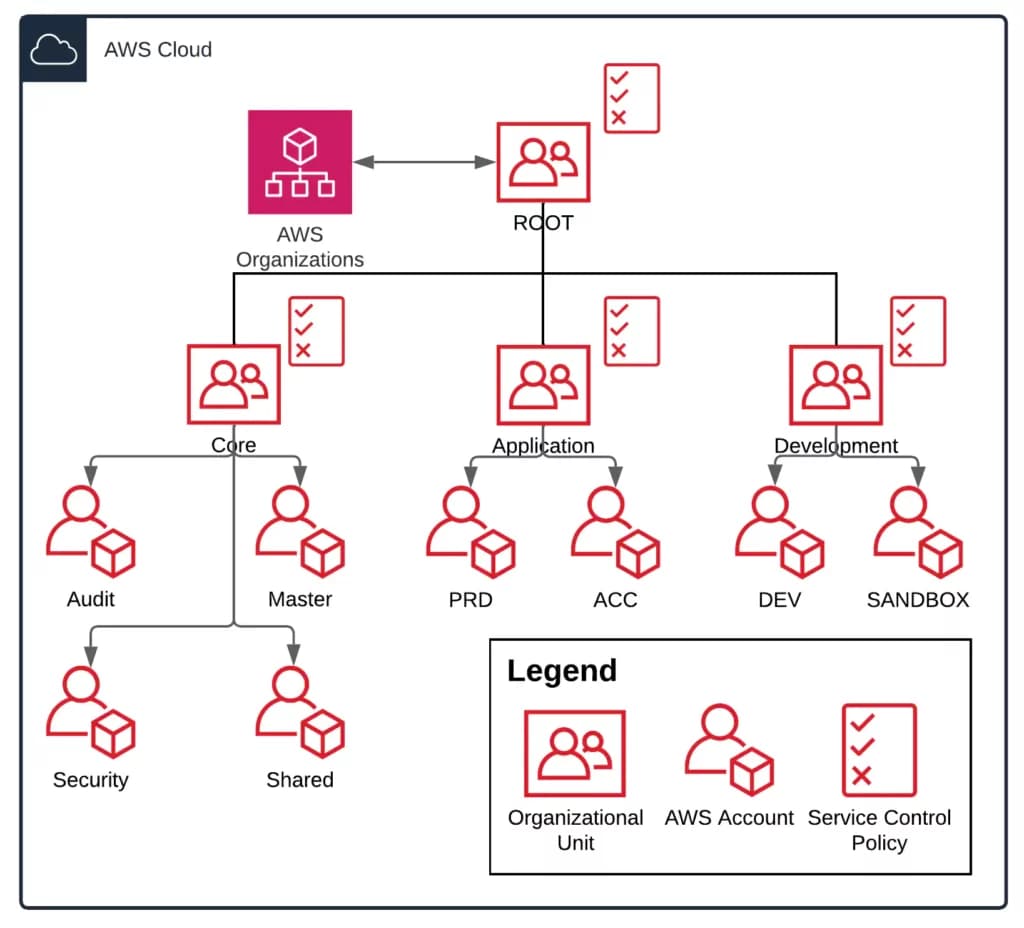
AWS Organizations account setup with OU and SCPs
In this structure, the OUs are categorized by workload type. The Application OU contains production and test environments that need strict security controls. The Development OU contains sandbox accounts where developers can experiment with fewer restrictions.
SCPs inherit down the hierarchy: Root → OU → Account. If you attach an SCP to the Root, it affects every account. If you attach it to the Application OU, only accounts in that OU are affected.
Critical Limitations to Understand
Before implementing SCPs, you must understand these limitations:
Management Account Exemption: SCPs do NOT affect the management account (the account that created the organization). This is by design to prevent you from locking yourself out. For this reason, minimize the use of the management account for workloads. Use it only for organization management.
Service-Linked Role Exemption: Service-linked roles created by AWS services are exempt from SCPs. These roles are automatically created by services and cannot be restricted by SCPs.
Maximum Attachments: You can attach a maximum of 10 SCPs to any root, OU, or account, raised from 5 in May 2026. Plan your SCP strategy carefully to stay within this limit.
Policy Size Limit: The maximum size of an SCP document is 10,240 characters, also raised in May 2026 from the previous 5,120. For complex policies, you may need to split them into multiple SCPs.
SCP vs RCP vs Declarative Policies (2024 Context)
AWS introduced two new policy types in 2024 that complement SCPs:
Resource Control Policies (RCPs) (launched November 2024): While SCPs control what principals (users, roles) can do, RCPs control what can be done TO resources. RCPs are particularly useful for implementing data perimeters and preventing resource sharing outside your organization.
Declarative Policies: These define desired configuration states rather than permissions. They're used for enforcing configuration compliance (e.g., "all S3 buckets must have versioning enabled").
When to use each:
- SCPs: Restrict principal actions across accounts (most common use case)
- RCPs: Restrict who can access your resources, implement data perimeters
- Declarative Policies: Enforce configuration standards and compliance requirements
For most organizations starting with governance, SCPs are the foundation. Add RCPs and declarative policies as your governance maturity increases.
Major SCP Updates You Need to Know (2025)
In September 2025, AWS announced full IAM policy language support for SCPs. This fundamentally changed what's possible with SCPs and how you should design them.
Full IAM Policy Language Support (September 2025)
Prior to September 2025, SCPs had limited syntax compared to IAM policies. Now SCPs support the complete IAM policy language, including:
Conditions in Allow Statements: You can now use conditions to create more precise allow statements. Example: Allow EC2 actions only if the instance has specific tags.
Individual Resource ARNs in Deny Statements: Previously, you could only use wildcards in deny statements. Now you can deny access to specific resources by ARN. Example: Deny access to a specific IAM role or S3 bucket.
NotAction with Allow Statements: Allow everything except specific actions. Useful for creating more flexible policies.
NotResource Element Support: Specify resources that are NOT affected by a statement.
Enhanced Wildcard Capabilities: More flexible action and resource matching using wildcards.
How These Changes Affect Your SCP Strategy
These updates mean you can now:
- Create more granular policies that were previously impossible
- Reduce the number of SCPs needed by combining logic into fewer, more precise policies
- Implement attribute-based access control (ABAC) using tag-based conditions
- Simplify policy maintenance by using conditions instead of multiple separate policies
Important: If you have existing SCPs created before September 2025, review them to see if they can be simplified or made more precise using the new capabilities.
Getting Started: Your First SCP Implementation
Now that you understand what SCPs are and the latest capabilities, let's walk through creating and activating your first SCP.
Prerequisites and AWS Organizations Setup
To use SCPs, you must have an AWS Organization. If you haven't created one yet, see our AWS Organizations: Complete Implementation Guide for comprehensive setup guidance including policy type enablement and service integrations. Quick setup:
- Go to the AWS Organizations Console
- Click Create an organization
- Select All features (required for SCPs)
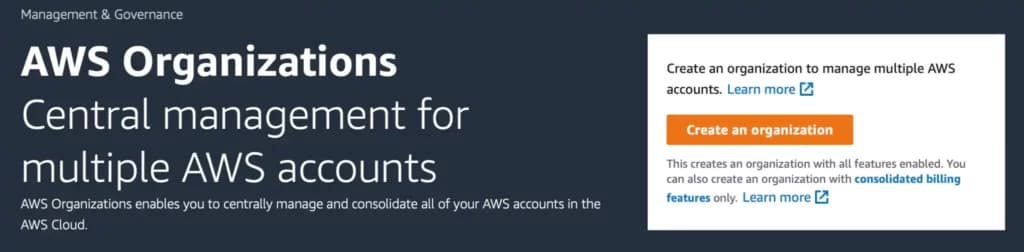
AWS Console: create an AWS Organization
Once created, you'll see your organization structure in the AWS Console. From here, you can create OUs and manage account groupings.
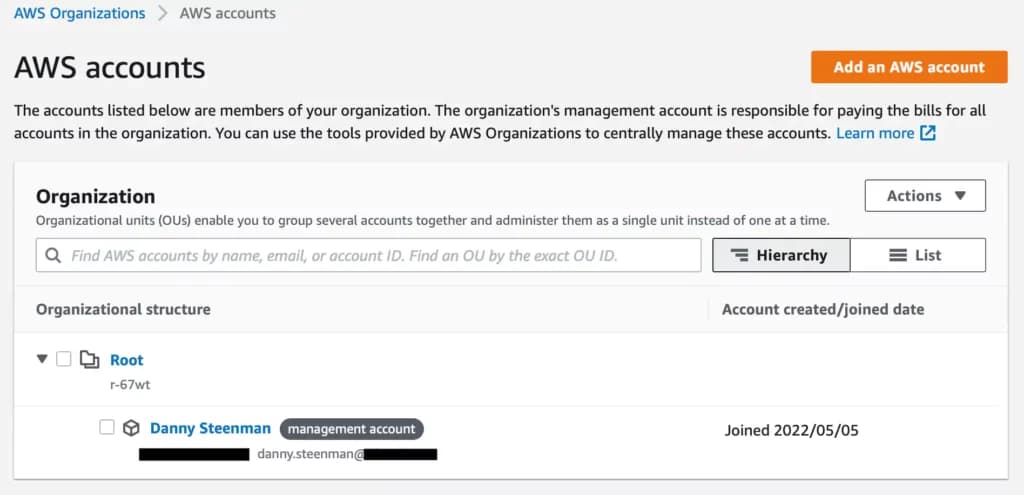
AWS console: AWS Organizations organizational structure
Enable Service Control Policies
By default, all policy types are disabled in a new organization. You need to explicitly enable SCPs.
Go to the Service Control Policies page and click Enable service control policies.
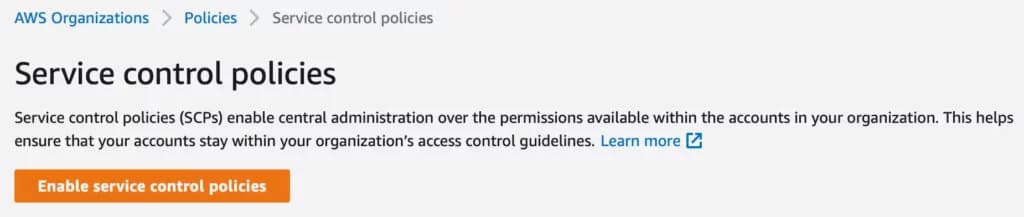
AWS console: AWS Organizations enable Service Control Policy
After enabling SCPs, you'll see a policy called FullAWSAccess is automatically created and attached to the Root of your organization.
Understanding FullAWSAccess Policy
The FullAWSAccess policy is managed by AWS and allows access to every operation:
{
  "Version": "2012-10-17",
  "Statement": [
    {
      "Effect": "Allow",
      "Action": "*",
      "Resource": "*"
    }
  ]
}
This policy must remain attached to the Root OU. Without it, all accounts would have zero permissions (since SCPs define the maximum possible permissions). Never detach this policy from the Root unless you have other allow statements that explicitly permit the actions your accounts need.
Create Your First SCP: Prevent Organization Departure
A common first SCP is to prevent member accounts from leaving the organization. This ensures centralized governance cannot be bypassed.
From the Service Control Policies page, click Create policy.
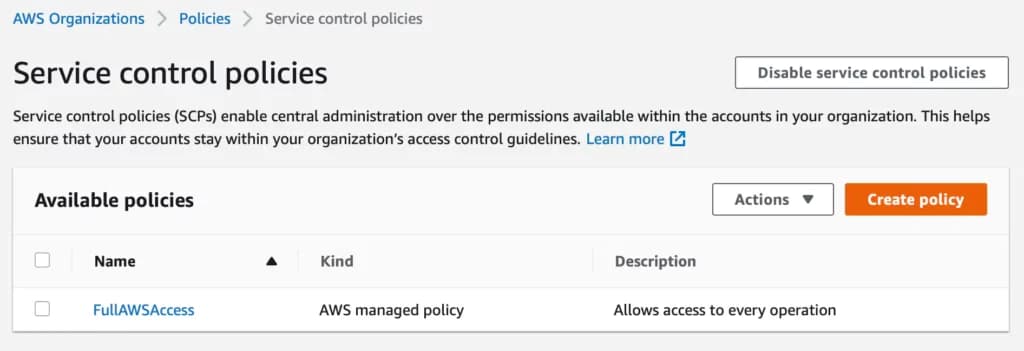
AWS console: AWS Organizations create new Service Control Policy
Add a policy name, description, and the following JSON:
{
  "Version": "2012-10-17",
  "Statement": [
    {
      "Sid": "PreventOrganizationDeparture",
      "Effect": "Deny",
      "Action": "organizations:LeaveOrganization",
      "Resource": "*"
    }
  ]
}
Click Create policy to save it.
Note: Remember the maximum SCP size is 10,240 characters. For simple policies like this, you're nowhere near the limit. For complex policies with many statements, watch your policy size.
Attach SCP to Test OU
Creating an SCP doesn't activate it. You must attach it to an OU or account.
Best practice: Create a dedicated test OU first. Never attach untested SCPs directly to your Root or production OUs.
- Go to the Targets tab of your newly created policy
- Click Attach
- Select your test OU or a non-critical account
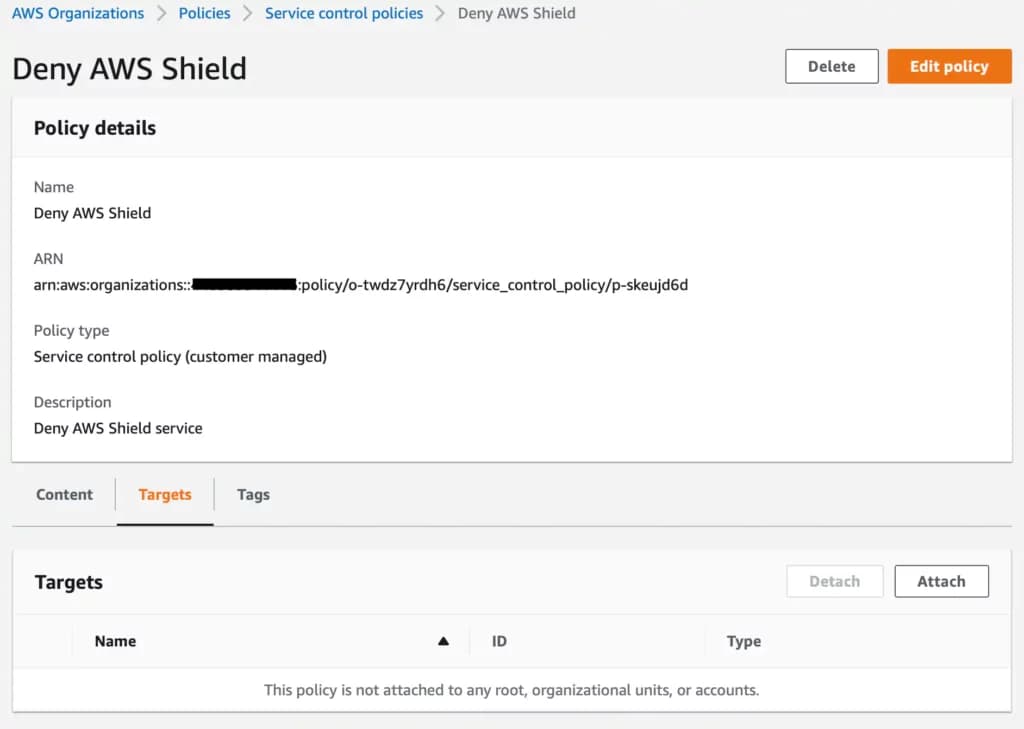
AWS console: AWS Organizations Service Control Policy rule target tab
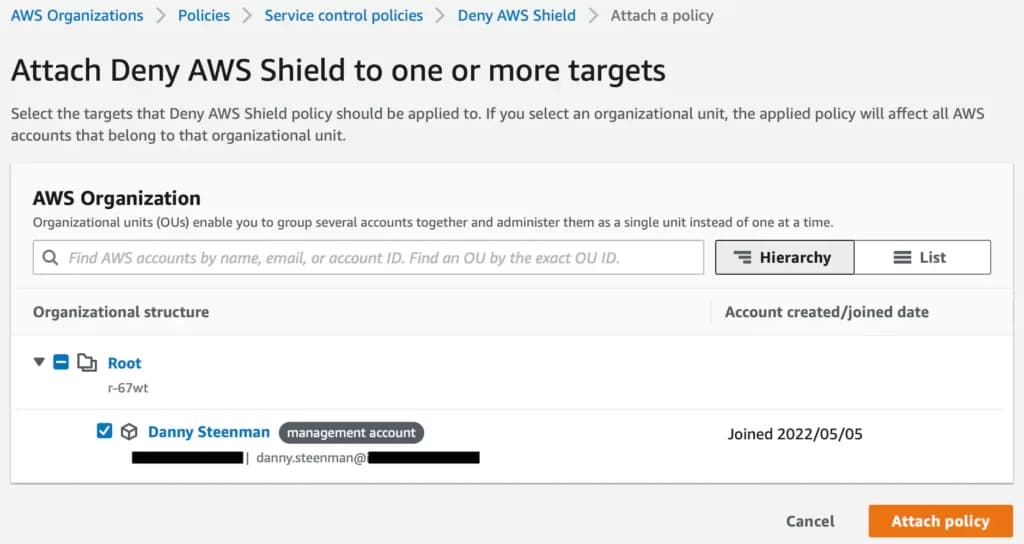
AWS console: AWS Organizations attach Service Control Policy to a target AWS account
The SCP takes effect immediately. Any IAM user or role in that account will now be denied the ability to call organizations:LeaveOrganization.
Validate with CloudTrail
After attaching an SCP, validate it's working as expected using CloudTrail:
- Attempt the blocked action from the affected account
- Check CloudTrail for the event
- Verify you see an
Access Deniederror witherrorCode: "AccessDenied"anderrorMessagementioning the SCP
This validation step is critical. It confirms your SCP is correctly attached and functioning before you expand it to more accounts.
Essential SCP Patterns: Examples You'll Actually Use
While the gap analysis recommended 12+ examples, I've curated the 3 most impactful SCPs that solve real-world governance problems. For a comprehensive library of production-ready SCP examples organized by OU type, see my AWS SCP Examples guide.
1. Regional Restrictions (Global Service Exemptions)
Use Case: Restrict all actions to specific AWS regions to meet data residency requirements and reduce attack surface. This is one of the most common SCPs for compliance-driven organizations.
{
  "Version": "2012-10-17",
  "Statement": [
    {
      "Sid": "DenyAllOutsideApprovedRegions",
      "Effect": "Deny",
      "NotAction": [
        "a4b:*",
        "acm:*",
        "aws-marketplace-management:*",
        "aws-marketplace:*",
        "aws-portal:*",
        "budgets:*",
        "ce:*",
        "chime:*",
        "cloudfront:*",
        "config:*",
        "cur:*",
        "directconnect:*",
        "ec2:DescribeRegions",
        "ec2:DescribeTransitGateways",
        "ec2:DescribeVpnGateways",
        "fms:*",
        "globalaccelerator:*",
        "health:*",
        "iam:*",
        "importexport:*",
        "kms:*",
        "mobileanalytics:*",
        "networkmanager:*",
        "organizations:*",
        "pricing:*",
        "route53:*",
        "route53domains:*",
        "s3:GetAccountPublic*",
        "s3:ListAllMyBuckets",
        "s3:PutAccountPublic*",
        "shield:*",
        "sts:*",
        "support:*",
        "trustedadvisor:*",
        "waf-regional:*",
        "waf:*",
        "wafv2:*",
        "wellarchitected:*"
      ],
      "Resource": "*",
      "Condition": {
        "StringNotEquals": {
          "aws:RequestedRegion": [
            "eu-west-1",
            "eu-central-1"
          ]
        }
      }
    }
  ]
}
Gotchas:
- Global services (IAM, CloudFront, Route 53, etc.) must be exempted using
NotActionor they'll be blocked entirely - This SCP does NOT prevent S3 bucket creation in restricted regions if done via global S3 APIs
- Test thoroughly in a sandbox account first as it can block legitimate operations
2. Prevent S3 Public Access
Use Case: Prevent accidental exposure of sensitive data by blocking any action that makes S3 buckets or objects public. This is critical for compliance (SOC 2, HIPAA, PCI-DSS) and preventing data breaches.
{
  "Version": "2012-10-17",
  "Statement": [
    {
      "Sid": "DenyS3PublicAccess",
      "Effect": "Deny",
      "Action": [
        "s3:PutAccountPublicAccessBlock",
        "s3:PutBucketPublicAccessBlock",
        "s3:PutBucketAcl",
        "s3:PutObjectAcl",
        "s3:PutBucketPolicy"
      ],
      "Resource": "*",
      "Condition": {
        "StringEquals": {
          "s3:PublicAccessBlockConfiguration.BlockPublicAcls": "false"
        }
      }
    },
    {
      "Sid": "DenyS3BucketPolicy",
      "Effect": "Deny",
      "Action": "s3:PutBucketPolicy",
      "Resource": "*",
      "Condition": {
        "StringNotEquals": {
          "s3:x-amz-acl": "private"
        }
      }
    }
  ]
}
Gotchas:
- This SCP prevents changing the S3 Public Access Block settings to allow public access
- Does NOT prevent public access if it's already configured (apply this SCP before configuring buckets)
- For public-facing websites or CDN origins, create an exemption OU without this SCP
3. Require MFA for Sensitive Operations
Use Case: Require multi-factor authentication before performing destructive or security-sensitive actions. This prevents compromised credentials from being used for major damage.
{
  "Version": "2012-10-17",
  "Statement": [
    {
      "Sid": "DenyActionsWithoutMFA",
      "Effect": "Deny",
      "Action": [
        "ec2:StopInstances",
        "ec2:TerminateInstances",
        "rds:DeleteDBInstance",
        "rds:DeleteDBCluster",
        "s3:DeleteBucket",
        "dynamodb:DeleteTable",
        "iam:DeleteUser",
        "iam:DeleteRole"
      ],
      "Resource": "*",
      "Condition": {
        "BoolIfExists": {
          "aws:MultiFactorAuthPresent": "false"
        }
      }
    }
  ]
}
Gotchas:
- Service-to-service calls (e.g., Lambda deleting a DynamoDB table) don't have MFA context and will be denied
- Apply this only to accounts where human operators perform these actions
- For automation accounts, use a separate OU without this SCP
Looking for more examples? Check out my comprehensive AWS SCP Examples guide with production-ready policies organized by OU type: Production, Development, Security, Sandbox, and Infrastructure.
Testing and Deployment Strategy
Never attach untested SCPs to your Root OU or production accounts. A misconfigured SCP can break critical operations organization-wide. Here's the safe, staged approach:
Create Dedicated Testing OU
- Create a new OU called
SCP-Testingor similar - Move a non-critical sandbox account into this OU
- Ensure the
FullAWSAccesspolicy is still attached to the Root (inherited by all OUs) - Attach your new SCP to the
SCP-TestingOU
This isolates the SCP to a single account where you can validate behavior without risk.
Staged Rollout Process
Once you've validated the SCP in your test account, follow this rollout sequence:
- Sandbox/Development accounts (lowest risk)
- Staging/Pre-production accounts (moderate risk)
- Production accounts (highest risk, last to update)
Move one account at a time into the OU with the new SCP attached. Monitor for 24-48 hours before proceeding to the next account.
Communicate proactively with account owners before applying SCPs. Let them know what's changing and when. Set up a feedback channel (Slack, email) where users can report issues immediately.
Using CloudTrail to Monitor Impact
CloudTrail is your best tool for identifying SCP-related denials. After applying an SCP, search CloudTrail for denied requests:
- Go to CloudTrail Event History
- Filter by
errorCode: AccessDenied - Look for
errorMessagecontaining "denied by service control policy"
Example CloudTrail query (using CloudTrail Lake or Athena):
SELECT
  eventTime,
  eventName,
  userIdentity.arn,
  errorCode,
  errorMessage
FROM cloudtrail_logs
WHERE errorCode = 'AccessDenied'
  AND errorMessage LIKE '%service control policy%'
ORDER BY eventTime DESC
This shows you exactly what actions are being blocked by your SCP and who is affected.
IAM Service Last Accessed Data
Before creating an SCP that denies access to a service, check if that service is actually being used:
- Go to IAM → Roles (or Users)
- Select a role → Access Advisor tab
- Review the "Last accessed" column for each service
If a service hasn't been accessed in 90+ days, it's likely safe to block. If it was accessed recently, investigate who's using it and why before blocking.
Validation with IAM Access Analyzer
IAM Access Analyzer (launched 2020, enhanced in 2024) can validate your SCP logic before deployment:
- Go to IAM Access Analyzer
- Use the policy validation feature to check for syntax errors
- Simulate how the SCP interacts with existing IAM policies
This catches errors like invalid action names, malformed ARNs, or conflicting statements before you deploy.
Rollback Procedures
If an SCP breaks critical operations, you need a fast rollback plan:
Immediate Rollback: Detach the SCP from the affected OU or account. Changes take effect within seconds.
Partial Rollback: If only part of the SCP is problematic, edit the policy to remove the offending statement, then reattach.
Emergency Access: Always maintain a break-glass IAM user or role in the management account (which is exempt from SCPs) for emergency access.
Store your rollback procedures in a runbook accessible to your operations team. Practice the rollback at least once so everyone knows the process.
Troubleshooting SCPs: Debug "Access Denied" Errors
One of the most common questions I hear is: "Why am I getting Access Denied when my IAM policy clearly allows this action?"
The answer is almost always: SCPs, resource policies, or permission boundaries. Here's how to debug it.
Common SCP Denial Scenarios
Scenario 1: IAM policy allows an action, but SCP denies it.
- Result: Access Denied
- Solution: Update the SCP to allow the action, or move the account to a different OU with less restrictive SCPs
Scenario 2: Regional restriction SCP blocks a global service.
- Result: Access Denied for services like IAM or CloudFront
- Solution: Add global service actions to the
NotActionlist in your regional SCP
Scenario 3: MFA requirement SCP blocks service-to-service calls.
- Result: Lambda function can't delete DynamoDB table even though IAM role allows it
- Solution: Exempt automation accounts from MFA requirement SCPs
How to Identify SCP Denials in CloudTrail
When an SCP denies a request, CloudTrail logs it with specific indicators:
{
  "errorCode": "AccessDenied",
  "errorMessage": "User: arn:aws:iam::123456789012:user/alice is not authorized to perform: ec2:RunInstances because no service control policy allows the ec2:RunInstances action"
}
Key phrase: "because no service control policy allows"
If you see this in CloudTrail, the issue is definitely an SCP. Now you need to find which SCP is causing the problem.
Debugging SCP vs IAM vs Resource Policy Conflicts
When you get Access Denied, the culprit could be:
- SCP (organization-level restriction)
- IAM policy (user/role-level restriction)
- Resource policy (resource-level restriction)
- Permission boundary (IAM-level restriction)
Debugging steps:
- Check the CloudTrail errorMessage: Does it mention "service control policy"? If yes, it's an SCP.
- Check the account: Is this the management account? If yes, it's NOT an SCP (management accounts are exempt).
- Use IAM Policy Simulator: Test the specific action with the IAM user/role. If the simulator says "allowed" but the real request is denied, it's likely an SCP or resource policy.
- Check attached SCPs: Go to AWS Organizations → Accounts → Select the account → View the "Policies" tab to see all attached SCPs.
Using IAM Policy Simulator
The IAM Policy Simulator helps you test whether a specific IAM policy allows an action, independent of SCPs:
- Go to IAM Policy Simulator
- Select the IAM user or role
- Select the AWS service and action
- Run the simulation, see example below.
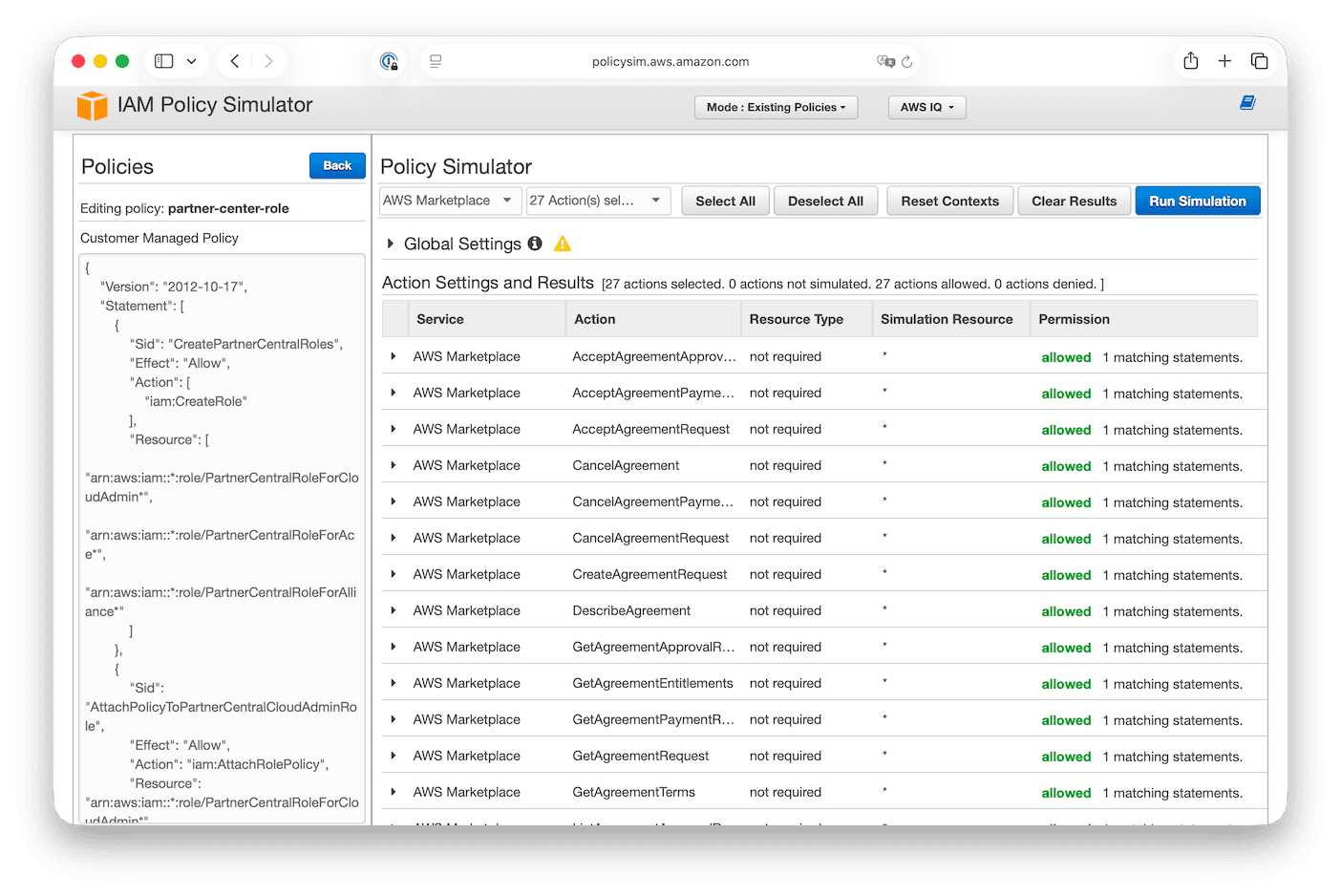
If the simulator shows "allowed" but the real request is denied, the issue is NOT the IAM policy. It's either an SCP, resource policy, or permission boundary.
Real-World Example with Solution
Problem: A developer reports they can't launch an EC2 instance in us-west-2, but their IAM policy clearly allows ec2:RunInstances.
Debugging:
- Check CloudTrail for the denied request
- Error message: "no service control policy allows the ec2:RunInstances action"
- Check attached SCPs on the developer's account
- Find regional restriction SCP that only allows
us-east-1andeu-west-1
Solution: Either:
- Add
us-west-2to the allowed regions in the SCP, OR - Move the developer's account to a different OU with a less restrictive regional SCP, OR
- Explain to the developer that
us-west-2is not allowed per company policy
This structured approach solves 95% of SCP-related Access Denied issues.
Best Practices for Service Control Policies
After creating and testing hundreds of SCPs across different organizations, these are the patterns that work:
Deny-List vs Allow-List Strategy
SCPs can be configured as either:
- Deny-List: Actions are allowed by default (via
FullAWSAccess), and you explicitly deny specific actions - Allow-List: Actions are denied by default, and you explicitly allow specific actions
Best practice: Use deny-list for most organizations.
Why? AWS launches new services constantly. With a deny-list approach, new services are automatically available unless explicitly blocked. With an allow-list, every new service is blocked by default, requiring constant SCP updates to keep pace with AWS releases.
Exception: Highly regulated environments (financial services, healthcare) may require allow-list approaches to maintain strict control. If you go this route, assign a team to monitor AWS What's New and update SCPs regularly.
Use Explicit Deny Statements
AWS updated its SCP guidance in 2025 to emphasize: Use explicit Deny statements rather than relying on implicit denies.
Why? Deny statements in SCPs cannot be overridden by IAM policies. This creates predictable, enforceable guardrails. Allow statements, by contrast, can be overridden by broader allow statements higher in the hierarchy.
{
  "Effect": "Deny",
  "Action": "s3:DeleteBucket",
  "Resource": "*"
}
This is stronger and more predictable than trying to achieve the same result with allow statements.
Leverage Conditions for Precision
The September 2025 IAM language update enables conditions in allow statements. Use them to create precise policies:
{
  "Effect": "Allow",
  "Action": "ec2:RunInstances",
  "Resource": "*",
  "Condition": {
    "StringEquals": {
      "ec2:InstanceType": ["t3.micro", "t3.small", "t3.medium"]
    }
  }
}
This allows launching EC2 instances ONLY if they're specific instance types. Much more precise than blocking or allowing all EC2 actions.
OU Structure Considerations
Design your OU structure to match your SCP strategy:
- Group accounts by similar security/compliance requirements
- Create separate OUs for different environment types (Production, Development, Sandbox)
- Create separate OUs for different compliance scopes (PCI-DSS, HIPAA, SOC 2)
- Keep your OU hierarchy shallow (2-3 levels max) for easier SCP management
Example OU structure:
Root
├── Production
│   ├── PCI-Compliant
│   └── General
├── Development
│   ├── Shared-Dev
│   └── Sandbox
└── Security
    ├── Logging
    └── Audit
Apply progressively stricter SCPs as you move from Sandbox → Development → Production → PCI-Compliant.
Monitoring and Maintenance Cadence
SCPs aren't "set and forget." Establish a maintenance cadence:
- Quarterly: Review CloudTrail for SCP denials. Are there legitimate use cases being blocked?
- Quarterly: Review new AWS service launches. Do any need to be explicitly blocked?
- Annually: Audit all SCPs for relevance. Remove or update outdated policies.
- After incidents: If a security incident occurs, review whether SCPs could have prevented it.
Assign an owner to each SCP (document this in the policy description). That owner is responsible for monitoring, updates, and responding to feedback.
Emergency Access and Break-Glass Procedures
Always maintain emergency access:
- The management account is exempt from SCPs. Keep a break-glass IAM user here with MFA.
- Document the emergency access procedure in your runbooks.
- Log all uses of emergency access and review them in security meetings.
- Test your break-glass procedure at least annually.
Never create SCPs that could lock you out of critical operations with no escape hatch.
SCP Limits and Quotas
AWS imposes limits on SCPs to prevent abuse and performance issues. Know these limits as you scale:
| Quota | Limit | Notes |
|---|---|---|
| Maximum policy size | 10,240 characters | Includes all JSON characters (whitespace, formatting, etc.) |
| Maximum SCPs attached to entity | 10 | Per root, OU, or account |
| Maximum depth of OU hierarchy | 5 levels | Root counts as level 0 |
| Maximum OUs in organization | 1,000 | Across the entire organization |
| Maximum accounts in organization | 10,000 (default), can be increased | Request limit increase via AWS Support |
Impact on your SCP strategy:
Policy Size: If you hit the 10,240 character limit, split your SCP into multiple smaller policies. For example, split regional restrictions and S3 protection into separate SCPs.
10 SCP Maximum: This is the most common limitation. Plan your SCPs carefully. Consider:
- Combine related restrictions into single SCPs where possible
- Use JSON minification to reduce policy size (though this hurts readability)
- Prioritize the most critical guardrails if you hit the limit
OU Hierarchy Depth: Keep your OU structure shallow (2-3 levels) not just for SCP management ease, but to avoid hitting the 5-level limit.
SCPs in the Broader AWS Governance Ecosystem
SCPs are powerful, but they're just one piece of a comprehensive governance strategy. Here's how they fit into the broader AWS ecosystem:
Integration with AWS Organizations Features
To implement effective security guardrails, consider setting up a comprehensive cloud foundation with AWS Landing Zone that incorporates SCPs as part of your overall multi-account strategy. When choosing your landing zone approach, evaluate Control Tower alternatives to ensure your implementation method supports the SCP complexity you need. For complete implementation guidance including Organizations setup, essential SCP patterns, testing workflows, and integration with IAM Identity Center and centralized logging, see AWS Multi-Account Best Practices.
SCPs work best when combined with:
- AWS Organizations: Centralized account management and billing
- IAM Identity Center (SSO): Centralized identity and federated access
- AWS CloudTrail: Organization-wide logging and monitoring
- AWS Config: Compliance monitoring and resource inventory
- AWS Control Tower: Pre-built guardrails and account factory (if you're not using an IaC-first approach)
Working with IAM Identity Center (SSO)
When you use IAM Identity Center with SCPs:
- SCPs apply to all principals, including SSO-federated users
- Permission sets in IAM Identity Center grant permissions; SCPs limit the maximum
- Test SCP impact on SSO users by logging in to an affected account and attempting restricted actions
Centralized Logging and Monitoring
For SCP governance, centralized CloudTrail is essential:
- Enable organization trail in the management account
- Send logs to a dedicated security/logging account
- Use CloudTrail Insights to detect anomalous SCP denials
- Set up CloudWatch alarms for SCP-related Access Denied errors
This visibility is critical for understanding SCP impact across your organization.
Conclusion and Next Steps
AWS Service Control Policies are foundational for multi-account governance. They provide centralized permission boundaries that prevent security misconfigurations, control costs, and enforce compliance requirements across your entire organization.
Key takeaways from this guide:
- SCPs define the maximum permissions for accounts; IAM policies grant actual permissions
- Use a deny-list approach (allow by default, explicitly deny) for flexibility
- Always test SCPs in a dedicated OU before production deployment
- Monitor CloudTrail for SCP denials and user feedback
- The September 2025 IAM language update enables much more precise SCP logic
- Combine SCPs with RCPs and declarative policies for comprehensive governance
Your next steps:
- If you haven't already, enable SCPs in your AWS Organization
- Start with one of the three essential SCPs from this guide (regional restrictions, S3 public access prevention, or MFA requirements)
- Test it thoroughly in a sandbox account
- Roll out gradually to development, then production accounts
- Explore the comprehensive SCP examples library for production-ready policies organized by OU type
- Review your AWS Organizations best practices to enable critical policy types and service integrations
What SCPs are you implementing in your organization? What challenges have you faced with SCP governance? Drop a comment below and let's discuss your approach.
Next step