AWS certifications can accelerate your cloud career and validate expertise that employers actively seek. But with pass rates that challenge even experienced professionals, many candidates fail on their first attempt.
The difference between passing and failing often comes down to preparation strategy, not just technical knowledge. Many candidates spend weeks studying the wrong way or using ineffective resources.
This guide provides a complete roadmap to pass your AWS certification exam on your first attempt - from choosing the right certification path and study resources to mastering test-taking strategies that maximize your score. Whether you're targeting your first Cloud Practitioner badge or pursuing advanced specialties, these strategies apply to every AWS exam.
Why AWS Certifications Matter
Before diving into preparation tactics, let's address the obvious question: is AWS certification worth your time and investment? The short answer is yes, but the reasons go beyond just adding a credential to your resume.
AWS certifications provide a structured learning path through the vast AWS service catalog. With over 200 services available, knowing where to focus your learning can feel overwhelming. Certifications give you that focus by defining exactly which services and concepts matter for specific roles.
Career and Salary Impact
AWS certifications carry significant weight in the job market. Many job postings explicitly list certifications as requirements or preferred qualifications. For hiring managers, certifications serve as a reliable signal that you've invested time in developing cloud expertise.
The career impact extends beyond job hunting. I've seen engineers use certifications to transition into cloud roles from traditional IT backgrounds. AWS even documents success stories of professionals who leveraged certifications to pivot their careers entirely.
Certified professionals often command higher salaries because the credential reduces perceived hiring risk. When you hold an AWS certification, you're demonstrating that your knowledge meets an objective, industry-recognized standard.
The 50% Discount Benefit
Here's something many candidates don't realize: passing any AWS certification makes all future certifications more affordable. AWS provides every certified individual with a 50% discount voucher for their next certification exam.
This creates a compounding benefit. Once you pass your first exam, the cost barrier for continuing your certification journey drops significantly. If you're planning to pursue multiple certifications (which most serious cloud professionals do), this discount adds up quickly.
AWS re:Invent attendees also receive 50% discount vouchers, so if you attend the conference, take advantage of that benefit.
Choose Your Certification Path
AWS organizes its certification program into four levels, each building on the knowledge from the previous tier. Choosing the right starting point depends on your current experience and career goals.
Foundational Level
The AWS Certified Cloud Practitioner (CLF-C02) is the entry point for most people. No prior cloud experience is required, and the exam covers core AWS concepts rather than deep technical implementation.
This certification answers the question: "Do you understand what cloud computing is and how AWS services work at a high level?" If you're new to AWS or transitioning from another technical discipline, start here.
The Cloud Practitioner exam is also valuable for non-technical roles like project managers, sales teams, and executives who need to understand AWS well enough to make informed decisions.
AWS has also introduced the AI Practitioner certification at this level for those specifically interested in artificial intelligence and machine learning fundamentals.
Associate Level
Associate-level certifications require hands-on implementation skills. This is where you prove you can actually build things on AWS, not just explain concepts.
Three primary Associate certifications serve different career paths:
-
Solutions Architect Associate: Focus on designing distributed systems and selecting appropriate AWS services for specific use cases. This is the most popular AWS certification and applies to almost any cloud role.
-
Developer Associate: Focus on application development, deployment, and debugging on AWS. Ideal for software engineers working with AWS services.
-
CloudOps Engineer Associate: Focus on operations, monitoring, networking, and maintaining AWS workloads. Previously called SysOps Administrator, this certification validates operational expertise.
AWS has expanded the Associate tier with specialized certifications including Data Engineer Associate and Machine Learning Engineer Associate for those pursuing data and AI career paths.
Professional and Specialty Levels
Professional certifications challenge you with complex, multi-faceted scenarios that require 2+ years of AWS experience to tackle effectively. The Solutions Architect Professional and DevOps Engineer Professional exams are significantly harder than their Associate counterparts, with longer exam times (180-205 minutes) and more complex questions.
Specialty certifications demonstrate deep expertise in specific technical domains. The Security Specialty and Advanced Networking Specialty are active options for those wanting to prove domain-specific mastery. These exams run 170 minutes with 65 questions and cost $300 USD.
Create Your Study Plan
The biggest mistake I see candidates make is studying without a deadline. Book your exam date first, then work backward to create your study plan. This approach gives you a concrete goal and natural motivation to stay on track.
AWS recommends this strategy explicitly: booking an exam date provides motivation and structures your preparation. Without a deadline, study sessions tend to drift and lose urgency.
Recommended Study Time by Level
Different certification levels require different time investments. Here's what to expect:
Foundational (Cloud Practitioner): Plan for 3-6 months if you're completely new to cloud computing. With an existing IT background, you can compress this to 4-8 weeks of focused study.
Associate Level: Most candidates with prior IT or cloud experience need 40-80 hours of preparation. This typically translates to 6-12 weeks when studying part-time.
Professional Level: These exams assume 2+ years of hands-on AWS experience. Even with that background, plan for 8-12 weeks of dedicated preparation focusing on advanced scenarios.
Specialty Level: Time varies based on your existing domain expertise. If you already work in security, the Security Specialty will require less ramp-up than if you're entering that domain fresh.
Budget-Based Preparation Paths
Not everyone has the same budget for exam preparation. Here's how to approach certification at different price points:
Free Path ($0): AWS Skill Builder offers 600+ free digital courses and learning plans. For Cloud Practitioner specifically, see our complete exam guide with free resource recommendations. Add official practice question sets, AWS Free Tier labs, and YouTube content. The free Builder Labs learning plan includes 10 hands-on exercises to build practical skills without spending anything.
Low-Cost Path ($50-100): Add a third-party practice exam set from providers like Tutorials Dojo or purchase individual AWS official practice exams. This combination of free theory resources plus quality practice exams works well for most candidates.
Premium Path ($200-300): Full access to a structured video course, multiple practice exam sets, and AWS Skill Builder subscription with enhanced exam prep, game-based learning, and 200+ hands-on labs. This approach works best for those who prefer guided learning.
For a comprehensive list of options, check out my guide on free AWS learning resources.
Time-Constrained Study Strategies
If you can only dedicate 30-60 minutes per day, you can still pass. It just takes longer and requires more discipline.
30-minute daily plan: Expect a 12-week timeline with focused micro-sessions. Use commute time for videos at 1.5-2x speed. Reserve morning or evening blocks for hands-on practice.
1-hour daily plan: You can compress to 6-8 weeks. Split time between theory (video courses, documentation) and practice (labs, practice questions).
Weekend warrior: Dedicate larger Saturday and Sunday blocks for hands-on labs and deep study. Use weekday micro-sessions for review and practice questions.
AWS emphasizes leveraging small pockets of time. Five focused 30-minute sessions often outperform a single unfocused 2.5-hour block. Consistency beats intensity.
Essential Preparation Resources
AWS provides more free preparation resources than most candidates realize. The challenge isn't finding resources. It's selecting the right ones and using them effectively.
AWS Skill Builder (Free and Paid)
AWS Skill Builder is the primary official training platform. The free tier includes:
- 600+ digital courses and structured learning plans
- Over 1,000 free learning resources as of late 2025
- Official practice question sets
- AWS Cloud Practitioner Essentials course (regularly updated)
The paid subscription adds significant value for serious candidates:
- AWS Cloud Quest: Gamified training with hands-on scenarios
- AWS Builder Labs: 200+ hands-on labs in the actual AWS Console
- AWS Escape Room: Exam prep for Solutions Architect Associate combining exam-style questions with interactive puzzles
- AWS Jam challenges: Immersive problem-solving scenarios
- AWS Card Clash: Free-to-play learning game
Game-based learning might sound gimmicky, but these tools effectively reinforce concepts through active engagement rather than passive video watching.
Official Practice Exams and Exam Guides
Start by downloading the official exam guide for your target certification. AWS has moved these to AWS Documentation in a user-friendly web format that's regularly updated.
The exam guide tells you exactly what's in scope, the weighting of each domain, and includes sample questions. This document is your preparation roadmap.
AWS structures preparation into a 4-Step Exam Prep Plan:
- Official Practice Question Sets
- Standard courses (free)
- Enhanced courses (paid)
- Official Pretests
Take the Official Pretest to assess your readiness before scheduling your exam. If you're scoring below 70%, you're not ready.
Hands-On Practice with AWS Free Tier
Here's where many candidates fall short: they consume theory without building anything. AWS exams test practical application, not just memorization.
Use AWS Free Tier to get hands-on experience with actual services. Build a simple web application. Deploy a Lambda function. Configure a VPC. These experiences create mental models that help you answer scenario-based questions.
AWS Builder Labs provide a safe practice environment if you're nervous about accidentally incurring costs. The free learning plan includes 10 exercises that teach fundamentals without touching your AWS account.
Don't skip hands-on practice. Theory alone is insufficient for passing AWS exams.
AWS Whitepapers and Documentation
For deeper technical knowledge, AWS whitepapers remain valuable resources:
- Well-Architected Framework: Foundational reading for any architecture-focused certification
- Security Best Practices: Essential for all exams, not just Security Specialty
- Service-specific documentation: Deep dives when you need to understand a service thoroughly
The Amazon Builders' Library offers engineering best practices from AWS's own teams. While not exam-specific, these articles provide context that helps you understand why AWS recommends certain approaches.
Understand the Exam Format
Knowing what to expect reduces exam-day anxiety and helps you prepare strategically.
Question Types
AWS certification exams have evolved beyond simple multiple-choice. You'll encounter:
Multiple-choice: One correct response and three incorrect responses (distractors). This remains the most common format.
Multiple-response: Two or more correct responses out of five or more options. The question always tells you how many answers to select.
Ordering questions (newer): Arrange steps or responses in logical order. These test procedural knowledge, like the correct sequence for a migration process.
Matching questions (newer): Pair prompts with corresponding responses. These test your understanding of relationships between concepts.
Case study questions (newer): Apply knowledge to detailed real-world scenarios. Currently used in AI Practitioner and Machine Learning Engineer exams, these may expand to other certifications.
The new question types test practical thinking more effectively than traditional formats. Practice exams that include these formats help you prepare.
Exam Duration and Passing Requirements
Timing varies by certification level:
| Level | Duration | Questions | Time per Question |
|---|---|---|---|
| Associate | 130 minutes | 65 questions | ~2 minutes |
| Professional | 180-205 minutes | 75-85 questions | ~2.4 minutes |
| Specialty | 170 minutes | 65 questions | ~2.6 minutes |
AWS does not disclose exact passing scores. Focus on understanding concepts rather than targeting a specific percentage. If you understand the material, you'll pass.
Register and Schedule Your Exam
Since January 2023, all AWS certification exams are delivered exclusively through Pearson VUE. PSI is no longer an option (if you've seen older guides mentioning PSI, they're outdated).
Pearson VUE Registration
To register:
- Sign in to aws.training
- Navigate to Certification
- Select your target exam
- Schedule through Pearson VUE
Pearson VUE operates over 5,000 testing centers across 180 countries, so you'll likely find a convenient location. Their nearly 30 years of assessment experience means the testing infrastructure is reliable.
Important: Your name on your AWS Certification account must match your government-issued ID exactly. Mismatches cause problems on exam day.
Test Center vs Online Proctoring
You have two options for taking the exam:
Test center: Controlled environment with no technical setup required. Staff handle logistics, and you can focus entirely on the exam. Consider this option if you're easily distracted at home or don't have a suitable private space.
Online proctoring: Take the exam from home or office. Requires a private, quiet space with video monitoring throughout. You'll need to complete a system test 24 hours before your exam.
Both options deliver the same exam content. Choose based on your environment and preferences.
For lengthy exams (170+ minutes), consider whether you'll need breaks. Test centers handle this more smoothly than online proctoring.
Exam Accommodations for Non-Native English Speakers
If English isn't your first language, you can request ESL +30 minutes as a permanent accommodation. This extra time applies to all future exam registrations automatically.
To request this accommodation:
- Go to your AWS Certification portal (Certmetrics)
- Find the accommodation request dropdown
- Select ESL +30 Minutes
On the homepage of Certmetrics you should see the following:
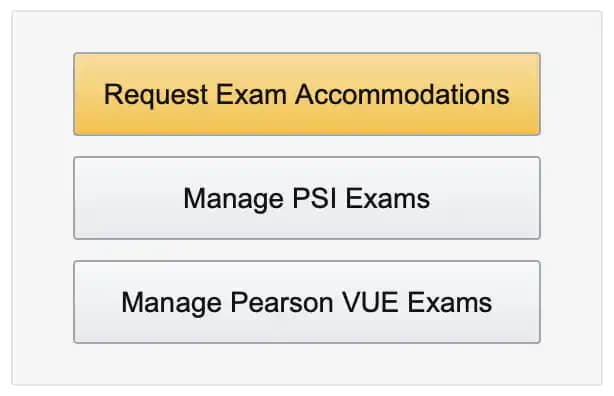
Then select the ESL +30 Minutes from the accommodation drop-down menu. This is a one-time procedure and will apply automatically once you schedule a new exam.
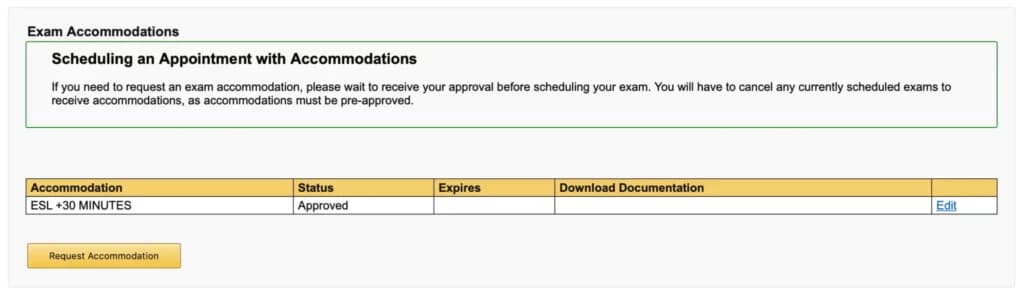
This one-time request significantly helps non-native speakers who need extra time to parse complex scenario questions.
AWS also offers exams in multiple languages including Arabic, French, German, Italian, Spanish, and Traditional Chinese for select certifications.
Exam Day Preparation
The day before and day of your exam matter more than people realize. Technical issues or environmental problems can derail an otherwise well-prepared candidate.
Online Proctoring Setup
If you're testing online, complete these steps:
24 hours before:
- Run the Pearson VUE system test
- Verify camera and microphone work properly
- Test internet connectivity stability
- Clear your testing area of all materials
Exam day:
- Use a private, quiet space
- Close all unnecessary applications
- Have your government-issued ID ready
- Check in early (15 minutes before scheduled time)
- Follow all proctor instructions exactly
The proctor will ask you to scan your room with your camera. Remove anything that could be interpreted as study materials.
What to Expect During the Exam
Know the rules before you sit down:
Prohibited items:
- Notes and writing instruments
- Phones and electronic devices
- Secondary monitors
- Food and drinks (varies by test center)
Required items:
- Valid government-issued ID
- Webcam and microphone (online only)
You'll sign a Non-Disclosure Agreement (NDA) before starting. This means you cannot share exam questions or answers with others. AWS takes this seriously, and violations can result in permanent bans from the certification program.
Brain dumps (unauthorized collections of exam questions) are strictly prohibited. Using them violates the NDA and undermines the value of certification for everyone.
Master Test-Taking Strategies
Good test-taking technique can add points to your score. These strategies help you maximize the value of your preparation.
Read Questions Strategically
AWS exam questions often contain long scenario descriptions designed to test whether you can identify what actually matters. Here's how to approach them:
Look for keywords that signal the right answer. Consider this example:
"You are working on a mobile gaming application and building the leaderboard feature to track top scores across millions of users. Which AWS services are best suited for this use case?"
- A. Amazon Redshift
- B. Amazon ElastiCache using Memcached
- C. Amazon ElastiCache using Redis
- D. Amazon S3
The keywords "mobile gaming," "leaderboard," "millions of users," and "best suited" point you toward the answer. Amazon Redshift and S3 aren't designed for high volumes of small reads and writes typical of mobile games. ElastiCache with Redis provides native functions that simplify leaderboard development, making C the correct answer.
Memcached could work but isn't "best suited" because sorting and ranking large datasets is more complex. The question asks for best, not just possible.
Answer mentally before reading choices. Form your answer before looking at the options. This prevents the distractors from creating doubt.
"You are creating an Amazon DynamoDB table for a social chat application with Username (String), Timestamp (Number), and Message (String) attributes. Which attribute should you use as the partition key? The sort key?"
Think: You need high cardinality for the partition key, and messages need time-based ordering. Username as partition key, Timestamp as sort key.
Then look at the options:
- A. Username, Timestamp
- B. Username, Message
- C. Timestamp, Message
- D. Message, Timestamp
Answer A matches your reasoning. Options B, C, and D look similar but don't align with DynamoDB best practices for this use case.
Time Management and Flagging
With approximately 2 minutes per question, you can't afford to get stuck. Here's your time strategy:
First pass: Answer questions you know confidently. Skip anything requiring deep thought or calculations. Flag uncertain questions for review.
Second pass: Return to flagged questions with fresh perspective. Often, later questions trigger memories that help with earlier ones.
Final review: Check all flagged answers before submitting. Never leave questions unanswered.
The exam interface lets you flag questions and navigate freely. Use this feature. Don't grind on a difficult question when easier points are waiting.
Process of Elimination Technique
When you're unsure, elimination improves your odds dramatically. Most questions have 1-2 obviously wrong answers.
Steps:
- Identify answers that don't fit AWS service models
- Eliminate answers that violate AWS best practices
- Remove options with services unsuitable for the stated requirements
- Choose from remaining options
If you eliminate 2 of 4 options, your odds improve from 25% to 50%. Even educated guessing beats leaving questions blank.
Never leave questions unanswered. There's no penalty for wrong answers, so always guess after elimination.
If You Don't Pass: Retake Strategy
Failing an AWS exam doesn't end your certification journey. Many successful professionals failed their first attempt.
Here's how to approach a retake:
Review your score report: AWS provides domain-by-domain scoring. Identify which areas were weakest and create a focused study plan targeting those gaps.
Change your approach: If you failed, something in your preparation didn't work. More of the same won't help. Consider different resources, more hands-on practice, or study groups.
Use retake promotions: AWS occasionally offers free retake promotions for new certifications. The AI Practitioner exam, for example, offered free retakes for early adopters who failed before February 2025.
Beta exam note: If you took a beta exam, results take up to 90 days while AWS normalizes scoring.
Standard retake policies apply after a waiting period. The specific duration varies, but you won't need to wait long before trying again.
Conclusion
Passing AWS certification exams requires more than technical knowledge. You need the right certification path, a structured study plan, quality resources, hands-on practice, and effective test-taking strategies.
Key takeaways:
- Choose the certification that matches your experience level and career goals
- Book your exam date first to create accountability
- Use AWS Skill Builder's free resources before paying for courses
- Prioritize hands-on practice over passive learning
- Apply strategic question-reading and time management during the exam
Start today: download the exam guide for your target certification, create an AWS Skill Builder account, and schedule your exam 6-12 weeks out. The deadline will drive your preparation.
For certification-specific guidance, check out the detailed exam guides:
- AWS Cloud Practitioner (CLF-C02)
- AWS Solutions Architect Associate (SAA-C03)
- AWS Developer Associate (DVA-C02)
- AWS CloudOps Engineer Associate (SOA-C03)
Which certification are you targeting? Share your preparation approach in the comments.
Frequently Asked Questions (FAQ)
How do I register and schedule an AWS exam?
Can I take the AWS certification exam from home?
What AWS certification should I get first?
How much do AWS certification exams cost?
What score do I need to pass an AWS certification exam?
How long are AWS certifications valid?
How long should I study for an AWS certification?
Can I get extra time on the exam if English isn't my first language?
Next step