The AWS Certified SysOps Administrator exam you might have prepared for no longer exists. As of September 2025, it's the AWS Certified CloudOps Engineer Associate (SOA-C03), a significant update that brings containers, modern operations practices, and multi-account architectures into scope.
This isn't just a name change. The exam content has evolved substantially, and many outdated study guides are still ranking in search results. If you're using SOA-C02 materials, you're studying for the wrong exam.
This guide gives you a complete preparation roadmap: personalized study timelines based on your experience level, domain-by-domain breakdown with service coverage, free and paid resource recommendations, hands-on practice strategies, and exam day tactics. Everything is based on the official SOA-C03 exam guide and AWS Training and Certification resources.
What is the AWS CloudOps Engineer Associate Certification?
The AWS Certified CloudOps Engineer Associate validates your expertise in deploying, operating, and maintaining workloads on AWS. It's designed for system administrators, operations engineers, and DevOps professionals who manage production AWS environments.
This certification sits at the Associate level in AWS's certification hierarchy, which means it expects hands-on implementation skills, not just theoretical knowledge. You'll need to demonstrate practical understanding of monitoring, automation, security, and cost optimization across AWS services.
Key Exam Details (SOA-C03)
Here's what you need to know about the exam itself:
| Detail | Specification |
|---|---|
| Exam Code | SOA-C03 |
| Price | $150 USD |
| Duration | 180 minutes |
| Format | Multiple-choice, multiple-response, ordering, matching, case study |
| Delivery | Pearson VUE test center or online proctoring |
| Passing Score | Scaled scoring (AWS doesn't disclose exact threshold) |
| Questions | 50-65 questions |
Note: Follow this advice on getting 30 minutes extra time to permanently receive additional time for all your AWS exams.
What Changed: From SysOps Administrator to CloudOps Engineer
AWS announced the certification rename in July 2025, with registration opening on September 9, 2025. The last day to take the previous SOA-C02 exam was September 29, 2025, meaning only SOA-C03 is available now.
The name change reflects the industry's shift in terminology. "CloudOps" better describes the modern role of cloud operations professionals who manage, monitor, and automate cloud infrastructure. But the changes go deeper than branding:
Key differences in SOA-C03:
- Containers are now in-scope: Amazon ECS, EKS, and ECR are testable topics
- Greater emphasis on multi-account, multi-Region architectures: Understanding AWS Organizations and multi-account strategy is more important than ever
- Increased focus on automation and infrastructure as code: Expect deeper questions on CloudFormation, Systems Manager, and Config
- More modern services and features: Updated content reflects AWS services released through 2025
- New question types: Ordering, matching, and case study questions test procedural knowledge
No task statements were removed from the previous exam, only additions and reorganization. If you studied for SOA-C02, you have a foundation, but you need to fill the gaps.
Impact on existing certifications: If you already hold the AWS Certified SysOps Administrator Associate, your certification remains valid until its expiration date. It won't automatically rename. You'll only earn the "CloudOps Engineer" title by passing the new SOA-C03 exam.
Who Should Take This Exam?
AWS designed this certification for professionals who manage AWS production environments. You're a good fit if you:
- Have at least 1-2 years of hands-on experience operating AWS workloads
- Know how to troubleshoot applications using AWS monitoring and logging services
- Understand fundamental networking concepts (DNS, TCP/IP, firewalls, VPCs)
- Can implement highly available, performant architectures
- Work with or aspire to work in cloud operations, DevOps, or platform engineering roles
This isn't an entry-level certification. If you're brand new to AWS, consider starting with the Cloud Practitioner certification to build foundational knowledge first.
Is the CloudOps Exam Right for You?
Before committing weeks or months to exam preparation, make sure CloudOps Engineer aligns with your career goals and current skill level. The wrong certification path wastes time and money.
Prerequisites and Recommended Background
AWS doesn't mandate specific prerequisites, but the Associate level assumes you can do more than recognize service names. You need implementation experience.
Recommended background:
- Hands-on experience managing, monitoring, and maintaining cloud infrastructure
- Familiarity with AWS core services (EC2, VPC, IAM, S3, CloudWatch)
- Understanding of operational concepts like monitoring, logging, backup, and disaster recovery
- Experience with at least one infrastructure as code tool (CloudFormation, CDK, Terraform)
Timeline expectations:
- If you're transitioning from on-premises infrastructure roles: 3-6 months to master AWS fundamentals before focused exam prep
- If you have AWS experience but not in operations: 4-8 weeks of targeted study
- If you already work in AWS operations daily: 2-4 weeks of exam-focused preparation
Should You Get Cloud Practitioner First?
The short answer: it depends on your background.
Start with Cloud Practitioner if:
- You're completely new to AWS
- You don't have hands-on cloud experience
- You want to validate foundational knowledge before investing in Associate-level prep
- Your organization values or requires foundational certification
Skip to CloudOps Engineer directly if:
- You have 6+ months of hands-on AWS experience
- You already work with CloudWatch, VPC, IAM, or EC2 regularly
- You've built or managed infrastructure on AWS
- You hold other cloud certifications
Cloud Practitioner adds 2-3 weeks to your total preparation time but builds a strong conceptual foundation. For complete beginners, it's worth the investment. For working cloud professionals, it's often unnecessary.
Read the AWS Cloud Practitioner exam guide if you decide the foundational path makes sense.
CloudOps vs Solutions Architect vs Developer Associate
AWS offers three Associate-level certifications, each targeting different roles and skill sets. Choosing the right one accelerates your career in the direction you want to go.
| Certification | Primary Focus | Best For |
|---|---|---|
| Solutions Architect Associate | Designing cost-effective, scalable architectures | Architects who design systems |
| Developer Associate | Building and deploying applications on AWS | Developers writing code for AWS |
| CloudOps Engineer Associate | Operating and maintaining production workloads | Operations engineers, SysAdmins, DevOps |
CloudOps Engineer focuses on the operational lifecycle: monitoring, logging, remediation, automation, and optimization. You're tested on keeping systems running, not designing them from scratch.
Solutions Architect Associate focuses on architectural decisions: choosing the right services, designing for availability, and optimizing costs at the design phase.
Developer Associate focuses on application development: CI/CD pipelines, serverless applications, SDK usage, and debugging.
Career progression insight: Many professionals earn multiple Associate certifications. CloudOps + Developer leads naturally to the AWS DevOps Engineer Professional certification, which validates expertise in both development and operations.
Study Timeline: Choose Your Path
Generic advice like "study for several weeks to months" isn't helpful. Your optimal timeline depends on your starting point. Here are four concrete paths based on experience level.
The timelines below assume you're dedicating 1-2 hours daily to focused study. Adjust proportionally if you have more or less time available.
Complete Beginner Path (8 Weeks)
This path is for you if you're new to AWS or have minimal cloud experience. You'll build foundational knowledge before diving into operations-specific content.
Week 1-2: AWS Fundamentals
- Complete Cloud Practitioner-level content on AWS Skill Builder
- Focus on core services: EC2, S3, VPC, IAM
- Understand the AWS global infrastructure and pricing model
- Goal: Pass a Cloud Practitioner practice assessment
Week 3-4: Core CloudOps Services
- Deep dive into CloudWatch (metrics, alarms, logs, dashboards)
- Learn IAM policies, roles, and permission boundaries
- Study VPC components, security groups, and network ACLs
- Hands-on: Set up basic monitoring for an EC2 instance
Week 5-6: Advanced Operations Topics
- Systems Manager (Session Manager, Patch Manager, Automation)
- CloudFormation fundamentals and stack operations
- AWS Config rules and compliance automation
- Container basics: ECS task definitions and services
Week 7: Practice Exams and Gap Identification
- Take your first full practice exam
- Score and categorize weak areas by domain
- Create targeted study plan for final week
- Review all incorrect answers thoroughly
Week 8: Targeted Review and Exam
- Focus 70% of time on weak domains identified
- Light review of strong areas to maintain knowledge
- Take final practice exam (aim for 80%+)
- Schedule and take the exam
Cloud Practitioner Holder Path (6 Weeks)
You've already validated foundational AWS knowledge. Now you'll focus on operational depth.
Week 1-2: Monitoring and Logging Deep Dive
- CloudWatch metrics, alarms, and composite alarms
- CloudWatch Logs, Logs Insights queries, and log retention management
- AWS X-Ray for distributed tracing
- CloudTrail for API logging and security analysis
- Hands-on: Build a monitoring dashboard and configure alarms
Week 3-4: Automation and Security
- Systems Manager capabilities (Automation, Run Command, State Manager)
- AWS Config rules and auto-remediation
- EventBridge rules and targets for automation
- IAM best practices, Organizations, and Service Control Policies (SCPs)
- Hands-on: Create an automation runbook
Week 5: Containers and Multi-Account Architecture
- ECS vs Fargate and when to use each
- ECS task roles vs execution roles
- EKS cluster operations basics
- AWS Organizations and Control Tower vs Organizations
- Hands-on: Deploy a containerized application on ECS
Week 6: Practice Exams and Exam
- Take 2-3 practice exams from different sources
- Deep review of all incorrect answers
- Final review of high-weight domains
- Schedule and take the exam
Solutions Architect Associate Holder Path (4 Weeks)
You understand AWS architecture. Now you'll learn to operate and maintain what you've designed.
Week 1: Monitoring Deep Dive
- CloudWatch metrics you didn't need for SAA (detailed monitoring, custom metrics)
- CloudWatch Logs Insights query syntax
- Alarm actions and composite alarms
- Container Insights for ECS/EKS monitoring
- Testing CloudWatch alarms
Week 2: Automation and Remediation
- Systems Manager Automation documents
- AWS Config rules with auto-remediation
- EventBridge rules for operational automation
- Patch management and compliance enforcement
- SSM Parameter Store vs Secrets Manager operations
Week 3: New SOA-C03 Content
- Container operations: ECS execute command, task definitions
- ECS vs EC2 decision framework
- Multi-account operations with Organizations
- AWS Backup and disaster recovery
- Cost optimization with Compute Optimizer and Trusted Advisor
Week 4: Practice Exams and Exam
- Focus on operations-specific scenarios
- Compare your SAA knowledge to CloudOps requirements
- Take 2 full practice exams
- Schedule and take the exam
Working Cloud Engineer Path (2 Weeks)
You operate AWS daily. Your goal is validating what you know and filling specific gaps.
Days 1-3: Assessment and Gap Identification
- Download and review the official SOA-C03 exam guide
- Take a practice assessment on AWS Skill Builder
- Identify weak domains from your score report
- Create targeted study list
Days 4-7: Fill Knowledge Gaps
- Focus on any unfamiliar services or concepts
- Containers if you don't use them daily
- Multi-account architecture if you work single-account
- Cost optimization services (Compute Optimizer, Trusted Advisor)
- Review documentation for services you use but don't fully understand
Days 8-10: Practice Exams
- Take 2-3 full-length practice exams
- Time yourself to simulate exam conditions
- Review ALL answer explanations, not just wrong ones
- Identify any remaining gaps
Days 11-14: Final Review and Exam
- Light review of flagged topics
- Quick refresher on exam domains and weightings
- Rest the day before the exam
- Take the exam
Best CloudOps Exam Study Resources
The right resources make preparation efficient. The wrong ones waste time on outdated content or topics not covered on the exam. Here's what actually works for SOA-C03.
Free Resources: AWS Skill Builder and Documentation
AWS provides substantial free preparation materials. For budget-conscious learners, you can pass using only free resources, though it requires more self-direction.
AWS Skill Builder (Free Tier):
- Exam Prep Plan: AWS Certified CloudOps Engineer - Associate (SOA-C03)
- Individual courses for each exam domain
- Free practice questions to understand exam format
- Self-paced digital courses covering core services
AWS Documentation:
- Service FAQs (especially CloudWatch, Systems Manager, Config)
- Best practices whitepapers (operations, security, cost optimization)
- Service user guides for deep technical understanding
AWS Builder Labs (Limited Free):
- Hands-on labs in actual AWS environments
- Specific labs: "Configuring metrics and alarms in Amazon CloudWatch"
- AWS Jam challenges for gamified learning
Solutions-Focused Immersion Days (SFIDs):
- Free, live virtual events led by AWS experts
- Cover core AWS services with hands-on components
- Check the AWS Training site for upcoming sessions
For more options, see 11 best free AWS learning resources.
Paid Resources Worth Considering
Paid resources accelerate learning and provide structured paths. They're not required but often worth the investment for time savings.
AWS Skill Builder Subscription ($29/month):
- Full access to all labs and hands-on experiences
- AWS SimuLearn for exam-style practice
- Additional practice question sets
- AWS Cloud Quest gamified learning
Video Courses:
- Stephane Maarek's courses (Udemy) are highly regarded in the community
- Look for courses explicitly updated for SOA-C03
- Avoid any course still referencing SOA-C02
Practice Exams:
- Tutorials Dojo practice exams (Jon Bonso) are frequently recommended
- Official AWS practice question sets
- Look for providers with updated SOA-C03 content
Important: Verify any resource is updated for SOA-C03. Content created before September 2025 is for the retired SOA-C02 exam and missing container coverage.
Recommended Resource Combinations
Not sure how to combine resources? Here are three approaches based on budget and learning style.
Budget Path (Free Only):
- AWS Skill Builder free courses
- AWS documentation and whitepapers
- Official free practice questions
- AWS Free Tier for hands-on practice
- Timeline: Add 1-2 weeks for self-directed learning
Balanced Path ($50-100):
- AWS Skill Builder free tier for courses
- One paid video course (Udemy, ~$15-20 on sale)
- One practice exam set (Tutorials Dojo, ~$15)
- AWS Free Tier for hands-on practice
- Best value for most learners
Accelerated Path ($150-200):
- AWS Skill Builder subscription for full lab access
- Paid video course for structured learning
- Multiple practice exam sources for variety
- Timeline: Can compress study by 1-2 weeks
By learning style:
- Visual learners: Prioritize video courses
- Hands-on learners: Invest in Skill Builder subscription for labs
- Readers: AWS documentation and whitepapers work well
- Test-takers: Multiple practice exam sources reveal gaps faster
SOA-C03 Exam Domains and What to Study
The exam covers five domains. Understanding what each domain tests helps you allocate study time effectively and recognize question patterns during the exam.
| Domain | Weight | Focus Areas |
|---|---|---|
| Monitoring, Logging, Analysis, Remediation & Performance | 22% | CloudWatch, X-Ray, troubleshooting, cost optimization |
| Reliability and Business Continuity | 22% | High availability, Auto Scaling, backup, disaster recovery |
| Deployment, Provisioning, and Automation | 22% | CloudFormation, Systems Manager, IaC, CI/CD basics |
| Networking and Content Delivery | 18% | VPC, Route 53, CloudFront, load balancing |
| Security and Compliance | 16% | IAM, encryption, compliance, Organizations, SCPs |
Domain 1: Monitoring, Logging, Analysis, Remediation, and Performance Optimization (22%) is tied for the highest weight. This domain now includes performance and cost optimization that was previously a separate domain in SOA-C02. You'll need deep CloudWatch expertise plus understanding of remediation automation.
Domain 2: Reliability and Business Continuity (22%) tests your ability to implement highly available, scalable systems. Key topics include Auto Scaling, load balancing, backup strategies, and disaster recovery procedures.
Domain 3: Deployment, Provisioning, and Automation (22%) focuses on infrastructure as code and deployment automation. CloudFormation, Systems Manager, and deployment strategies are critical here.
Domain 4: Security and Compliance (16%) covers implementing security controls, managing identities, and ensuring compliance. IAM, encryption, and governance tools like Organizations and SCPs are key.
Domain 5: Networking and Content Delivery (18%) tests VPC configuration, connectivity options, DNS with Route 53, and content delivery with CloudFront.
Domain 1: Monitoring, Logging, Analysis, Remediation, and Performance Optimization
This domain tests your ability to implement metrics, alarms, and log filters, primarily using CloudWatch. You should also know how to remediate issues automatically using EventBridge and Systems Manager. In SOA-C03, this domain now includes cost and performance optimization that was previously a separate domain.
Key services to know deeply:
- CloudWatch: Metrics (standard and custom), alarms, composite alarms, dashboards, Logs, Logs Insights, Container Insights
- CloudTrail: API logging, log file integrity, integration with CloudWatch
- AWS X-Ray: Distributed tracing, service maps, trace analysis
- EventBridge: Event patterns, rules, targets, scheduling
- Systems Manager: Automation documents, Run Command, remediation actions
- Cost Explorer: Cost analysis, forecasting, recommendations
- AWS Budgets: Budget alerts, actions, notifications
- Trusted Advisor: Checks across cost, security, performance, fault tolerance
- Compute Optimizer: EC2 and Lambda right-sizing recommendations
What you should be able to do:
- Configure CloudWatch alarms with appropriate statistics and periods
- Write CloudWatch Logs Insights queries to analyze log data
- Set up automated remediation using Config rules and SSM Automation
- Design monitoring dashboards for operational visibility
- Analyze costs and identify optimization opportunities
- Right-size EC2 instances based on utilization data
- Implement S3 lifecycle policies for cost optimization
CloudWatch statistics you must know:
| Statistic | Use Case |
|---|---|
| SampleCount | Number of data points in the period |
| Sum | Total value (e.g., total requests) |
| Average | Typical value over time |
| Minimum | Lowest observed value |
| Maximum | Highest observed value |
| Percentile (p99, p95) | Latency analysis |
EC2 placement groups:
| Strategy | Use Case |
|---|---|
| Cluster | Low latency, high throughput (HPC) |
| Partition | Large distributed workloads (Hadoop, Cassandra) |
| Spread | Critical instances that must avoid correlated failures |
Domain 2: Reliability and Business Continuity
This domain focuses on implementing scalability, elasticity, and high availability. You need to understand how to design and operate resilient systems.
Key services to know deeply:
- Auto Scaling: Scaling policies, health checks, lifecycle hooks
- Elastic Load Balancing: ALB, NLB, target groups, health checks
- Route 53: Health checks, routing policies, failover configurations
- AWS Backup: Backup plans, retention policies, cross-Region backup
- Elastic Disaster Recovery: DR strategies, recovery processes
Route 53 routing policies you must know:
| Policy | Use Case |
|---|---|
| Simple | Single resource, basic routing |
| Weighted | A/B testing, gradual migrations |
| Latency | Route to lowest-latency Region |
| Failover | Active-passive high availability |
| Geolocation | Region-specific content |
| Geoproximity | Custom traffic distribution |
| Multivalue | DNS-level load balancing |
What you should be able to do:
- Configure Auto Scaling policies (target tracking, step, scheduled)
- Set up Route 53 health checks with failover routing
- Implement backup strategies with appropriate retention
- Design multi-Region architectures for disaster recovery
Domain 3: Deployment, Provisioning, and Automation
This domain tests infrastructure as code and deployment strategies. You need to understand CloudFormation deeply and know various deployment patterns.
Key services to know deeply:
- CloudFormation: Template anatomy, stack operations, helper scripts, drift detection
- AWS CDK: What is AWS CDK, CDK constructs, synthesizing templates
- Systems Manager: State Manager, Automation, Patch Manager, Parameter Store
- AWS Config: Rules, conformance packs, remediation actions
CloudFormation helper scripts:
| Script | Purpose |
|---|---|
| cfn-init | Execute metadata configuration |
| cfn-hup | Monitor and apply metadata changes |
| cfn-signal | Signal completion of CreationPolicy/WaitCondition |
| cfn-get-metadata | View stack metadata |
Deployment strategies you must understand:
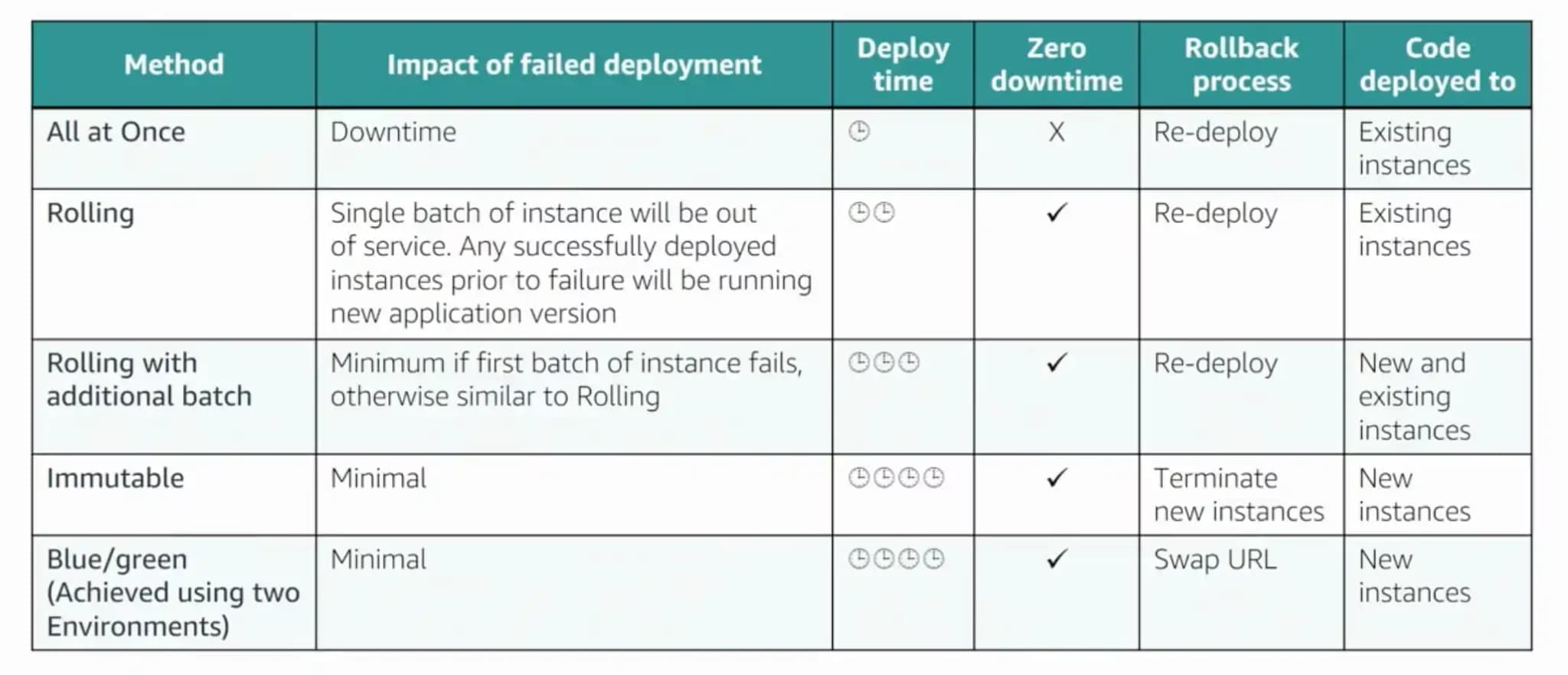
What you should be able to do:
- Write and troubleshoot CloudFormation templates
- Implement blue/green and rolling deployments
- Configure Systems Manager for patching and automation
- Use Config rules to enforce compliance
For deeper DevOps content, see the AWS DevOps Engineer Professional exam guide.
Domain 4: Security and Compliance
This domain covers IAM, encryption, and compliance enforcement. You need to understand both preventive and detective security controls.
Key services to know deeply:
- IAM: Policies, roles, permission boundaries, identity federation
- AWS Organizations: SCPs, SCP examples, organizational structure
- KMS: Key management, encryption contexts, key policies
- Secrets Manager: Secret rotation, cross-account access
- Security Hub: Findings, compliance standards, integrations
- AWS Config: Compliance rules, remediation
What you should be able to do:
- Write and troubleshoot IAM policies
- Implement encryption at rest and in transit
- Configure compliance automation with Config rules
- Understand multi-account security with Organizations and SCPs
For a deeper dive, read the AWS Security Specialty exam guide.
Domain 5: Networking and Content Delivery
This domain tests VPC configuration, connectivity options, and content delivery. You need to troubleshoot network issues and optimize content delivery.
Key services to know deeply:
- VPC: Subnets, route tables, security groups, NACLs, endpoints
- Elastic Load Balancing: ALB, NLB, connection draining, sticky sessions
- CloudFront: Distributions, origins, caching, Origin Access Control
- Route 53: DNS records, routing policies, hosted zones
- Direct Connect: Connections, virtual interfaces, redundancy
VPC components table:
| Component | Purpose |
|---|---|
| Subnets | IP address ranges for resources |
| Route Tables | Traffic routing between subnets |
| Internet Gateway | Public internet connectivity |
| NAT Gateway | Outbound internet for private subnets |
| Virtual Private Gateway | VPN connectivity |
| Security Groups | Stateful firewall at instance level |
| NACLs | Stateless firewall at subnet level |
| VPC Endpoints | Private connectivity to AWS services |
What you should be able to do:
- Design and troubleshoot VPC architectures
- Configure load balancers with appropriate health checks
- Set up CloudFront distributions with S3 origins
- Troubleshoot connectivity issues using VPC Flow Logs
New in SOA-C03: Container Services
Containers are the most significant addition to SOA-C03. If you haven't worked with ECS or EKS, this section is essential. Even if you have container experience, make sure you understand the operational aspects tested on the exam.
The exam focuses on operating containers, not developing containerized applications. You need to know how to deploy, monitor, and troubleshoot container workloads.
Amazon ECS for CloudOps
Amazon Elastic Container Service (ECS) is AWS's container orchestration service. It's the primary container service covered on the exam due to its AWS-native integration.
Key concepts you must understand:
Task Definitions: The blueprint for your containers. Know the difference between task roles and execution roles, as this is a common exam topic.
Launch Types: Understand when to choose ECS with Fargate vs EC2 and the operational implications of each:
- Fargate: AWS manages the infrastructure. Less operational overhead, but less control over the underlying compute.
- EC2: You manage the container instances. More control, but more operational responsibility.
For a broader comparison, see Amazon ECS vs Amazon EC2.
ECS Exec: Know how to access containers using ECS execute command for troubleshooting. This requires the SSM agent and appropriate IAM permissions.
Container Insights: CloudWatch Container Insights provides automatic dashboards for ECS metrics. You should know how to enable it and what metrics it collects.
Amazon EKS for CloudOps
Amazon Elastic Kubernetes Service (EKS) is AWS's managed Kubernetes service. The exam tests operational knowledge, not Kubernetes administration depth.
Key concepts for the exam:
- Cluster management: Creating, updating, and maintaining EKS clusters
- Node groups: Managed and self-managed node groups
- Fargate profiles: Running pods on Fargate without managing nodes
- IAM integration: IAM roles for service accounts (IRSA)
- Logging: Control plane logging to CloudWatch
ECS vs EKS decision criteria:
| Choose ECS When | Choose EKS When |
|---|---|
| AWS-native simplicity | Kubernetes expertise exists |
| Tight AWS service integration | Multi-cloud portability needed |
| Smaller operational team | Complex scheduling requirements |
| New to containers | Existing K8s workloads |
Container Monitoring and Operations
Container monitoring integrates with CloudWatch but requires specific configuration. The exam tests your understanding of container-specific observability.
CloudWatch Container Insights:
- Automatic collection of CPU, memory, network, and storage metrics
- Pre-built dashboards for ECS and EKS
- Per-container and per-task metrics
- Integration with CloudWatch alarms
Log aggregation:
- ECS: Configure the awslogs log driver in task definitions
- EKS: Use Fluent Bit or CloudWatch agent for log forwarding
- Know how to query container logs with Logs Insights
X-Ray integration:
- Trace requests across containerized microservices
- Instrument containers with the X-Ray SDK or daemon
- Analyze service maps for performance bottlenecks
Common troubleshooting scenarios:
- Container health check failures
- Task placement failures (insufficient resources)
- Networking issues (security groups, service discovery)
- IAM permission errors (task role vs execution role)
Hands-On Practice Strategy
Reading about AWS services won't prepare you for scenario-based questions. You need hands-on experience to understand how services behave in practice. This section covers how to practice safely without unexpected AWS bills.
Why Hands-On Experience is Critical
The CloudOps exam includes scenario-based questions that assume practical knowledge. You're not just choosing the correct service; you're choosing the correct configuration, parameter, or troubleshooting step.
Examples of what hands-on teaches you:
- CloudWatch alarm states and how they transition
- What happens when a Config rule finds non-compliant resources
- How Auto Scaling behaves during scale-in events
- Why certain IAM policies don't work as expected
The exam may also include lab-style questions where you perform tasks in a simulated AWS environment. Familiarity with the console and CLI gives you an advantage.
Setting Up Your Practice Environment
Create a dedicated AWS account for exam practice. This keeps your practice resources separate and makes cleanup easier.
Initial setup:
- Create a new AWS account (or use an existing sandbox account)
- Set up billing alerts immediately: Configure Budget alerts at $5, $10, and $20 thresholds
- Enable Cost Explorer for spend visibility
- Create an IAM user for practice (avoid using root for daily activities)
- Tag all resources with
Project: CloudOps-Prepfor easy cleanup
Cost control practices:
- Use t3.micro or t3.small instances (Free Tier eligible)
- Stop or terminate resources after each practice session
- Set CloudWatch alarms on billing metrics
- Avoid services with high hourly costs (large RDS instances, NAT Gateways)
- Use AWS Budgets actions to stop resources if budget exceeded
Essential Lab Scenarios
Focus on labs that align with exam domains. Here are priority scenarios to practice:
Monitoring and Logging:
- Create custom CloudWatch metrics from an application
- Configure CloudWatch alarms with different statistics
- Write CloudWatch Logs Insights queries
- Set up CloudTrail logging and analyze events
- Enable Container Insights for an ECS cluster
Automation:
- Create a Systems Manager Automation document
- Configure Config rules with auto-remediation
- Set up EventBridge rules to trigger Lambda functions
- Use Systems Manager Run Command across multiple instances
Deployment:
- Deploy a CloudFormation stack with parameters and outputs
- Perform a stack update and observe change sets
- Create a blue/green deployment using CodeDeploy
- Deploy a container application on ECS Fargate
Security:
- Write IAM policies and test with IAM Policy Simulator
- Configure KMS keys and use them for S3 encryption
- Set up Secrets Manager with automatic rotation
- Implement Config rules for compliance checking
Networking:
- Build a VPC with public and private subnets
- Configure VPC endpoints for S3 and DynamoDB
- Set up an Application Load Balancer with path-based routing
- Troubleshoot connectivity using VPC Flow Logs
Free Tier Optimization and Cost Control
AWS Free Tier includes many services useful for exam preparation. Know the limits to avoid charges.
Free Tier services useful for CloudOps prep:
- EC2: 750 hours/month of t2.micro (t3.micro in some Regions)
- S3: 5GB storage, 20,000 GET requests, 2,000 PUT requests
- Lambda: 1 million requests, 400,000 GB-seconds
- CloudWatch: 10 custom metrics, 10 alarms, 5GB log ingestion
- DynamoDB: 25GB storage, 25 read/write capacity units
Services to avoid or use carefully:
- NAT Gateway: $0.045/hour plus data processing charges
- Large RDS instances: Use db.t3.micro for practice
- Elastic IPs: Free when attached, charged when not
- EKS: $0.10/hour for the control plane
Cleanup automation:
- Schedule Lambda functions to stop EC2 instances nightly
- Use CloudFormation to deploy and destroy entire environments
- Tag resources and use Resource Groups for bulk operations
- Review Cost Explorer weekly during preparation
Practice Exams and Self-Assessment
Practice exams are essential for exam readiness, but timing and technique matter. Taking practice exams too early wastes them; taking them wrong reduces their value.
When to Start Taking Practice Exams
Don't burn through practice exams before you've studied the content. They're most valuable for identifying gaps, not learning new material.
Recommended timing:
- First practice exam: At 50-60% of your study timeline. Use this to identify major gaps.
- Second practice exam: At 75-80% of timeline. Measure improvement and find remaining gaps.
- Final practice exam(s): In the last few days. Validate readiness and build confidence.
Save official AWS practice questions for last. Third-party practice exams are good for learning; official questions are best for final validation since they match the actual exam style most closely.
How to Use Practice Exams Effectively
Taking a practice exam and checking your score isn't enough. The real value comes from deep review.
During the practice exam:
- Time yourself to simulate real conditions (roughly 2 minutes per question)
- Flag questions where you're uncertain
- Use process of elimination on difficult questions
- Don't look up answers during the exam
After the practice exam:
- Review EVERY answer explanation, including questions you got right
- For wrong answers, understand why each option is correct or incorrect
- Track your performance by domain
- Note patterns in question types you struggle with
Process of elimination strategy:
- Eliminate obviously wrong answers first
- Look for keywords that indicate correct/incorrect (always, never, must)
- Consider the scenario carefully; answers often depend on specific details
- When stuck between two options, consider which is more operationally sound
Identifying and Addressing Weak Areas
Use practice exam results to create a targeted remediation plan.
Tracking weak areas:
- After each practice exam, record your score by domain
- Calculate percentage correct per domain
- Identify domains below 70% as priorities
- Note specific services or concepts you consistently miss
Remediation approach:
- Below 60% in a domain: Return to learning resources for that domain
- 60-70% in a domain: Review specific weak topics, do targeted labs
- Above 70% in a domain: Light review to maintain knowledge
When to schedule the exam:
- Consistently scoring 80%+ on practice exams
- No domain below 70%
- Comfortable with question pacing
- Feeling confident about container and multi-account content
Exam Day Preparation
Exam day logistics can affect your performance. Knowing what to expect eliminates surprises and lets you focus on the questions.
Online Proctored vs Test Center
Both options are valid. Choose based on your environment and preferences.
Online proctored (at home):
- Convenience of taking the exam from your location
- Requires private, quiet space
- Must complete system test 24 hours before exam
- Video scan of room required before starting
- Camera and microphone monitored throughout
- Risk: Technical issues can disrupt your exam
Test center (Pearson VUE):
- Dedicated testing environment
- No concerns about home distractions
- Technical setup handled by the center
- May require travel time
- Limited scheduling flexibility
Recommendation: If you have a quiet, private space and reliable internet, online proctoring is convenient. If your home environment is unpredictable, a test center provides a controlled setting.
Technical Requirements and Security Measures
For online proctored exams, technical preparation prevents day-of issues.
24 hours before exam:
- Complete the system test on Pearson VUE
- Verify webcam and microphone work
- Test your internet connection stability
- Clear your desk and testing area
- Prepare your government-issued ID
Room requirements:
- Private room with closed door
- Clear desk (only computer and ID allowed)
- No notes, phones, or additional monitors
- No one else in the room during the exam
Prohibited items:
- Cell phones and smart watches
- Notes, books, or reference materials
- Additional monitors or screens
- Headphones or earbuds
- Food and drinks (water may be allowed)
ID requirements:
- Government-issued ID (passport, driver's license)
- Name on ID must exactly match your AWS Certification account
- ID must be valid (not expired)
Time Management and Test-Taking Strategies
With 65 questions in 180 minutes, you have approximately 2.5 minutes per question. That's adequate but requires discipline.
Pacing strategy:
- First pass: Answer questions you're confident about (mark uncertain ones for review)
- Second pass: Return to flagged questions
- Final 15 minutes: Review flagged questions, don't second-guess confident answers
Question approach:
- Read the entire question, including all answer options
- Identify what the question is actually asking (troubleshooting, best practice, most cost-effective)
- Eliminate obviously wrong answers
- Look for keywords that indicate the correct approach
Common traps:
- "Most" questions: Multiple answers may be correct, but one is MOST correct
- Scenario details matter: The answer often depends on specific requirements mentioned
- Cost questions: "Most cost-effective" isn't always cheapest, it's best value
- Time constraints: "Fastest" or "quickest" may override other considerations
Don't change answers: Unless you're certain your first answer was wrong, stick with it. Second-guessing often leads to changing correct answers to incorrect ones.
What If You Don't Pass?
Failing the exam is disappointing but not disqualifying. Many successful certified professionals didn't pass on their first attempt. The key is using the experience to improve.
Understanding Your Score Report
AWS provides a score report after the exam, even for failures. This report is your roadmap for improvement.
What the score report includes:
- Overall scaled score (pass threshold is not disclosed)
- Performance by domain (meets expectations, needs improvement)
- No specific question-level feedback
Interpreting domain scores:
- "Meets expectations": You demonstrated competency in this domain
- "Needs improvement": This domain contributed to your failure
Note: AWS uses scaled scoring, so raw percentage doesn't directly translate to your score. A 65% raw score might be passing or failing depending on question difficulty weighting.
Creating Your Retake Study Plan
Use your score report to create a targeted study plan for your retake.
Retake rules:
- 14-day waiting period before retake
- Full exam fee required ($150 USD)
- No limit on retake attempts
Study plan for retake:
- Focus 70% of study time on "needs improvement" domains
- Allocate 30% to maintaining strength in passing domains
- Use different resources than your first attempt (different perspective helps)
- Take practice exams from sources you haven't used before
- Increase hands-on practice in weak areas
Typical retake timeline:
- Most candidates retake 2-4 weeks after failure
- Rushing the retake often leads to similar results
- Better to add 1-2 weeks of focused study than fail again
Psychological approach:
- One failure doesn't define your capability
- Many AWS experts failed certifications before passing
- Treat the first attempt as an expensive practice exam
- Focus on what you learned, not what you lost
After Passing: Career Benefits and Next Steps
Passing the CloudOps Engineer exam validates your operational expertise. Here's what to do with that achievement.
Certification Validity and Recertification
AWS certifications are valid for three years from your pass date. After that, you must recertify to maintain your status.
Recertification options:
- Pass the current version of the CloudOps Engineer exam
- Pass the AWS DevOps Engineer Professional exam (recertifies both CloudOps and any Developer Associate)
- Pass a higher-level certification that includes CloudOps content
Your certification badge:
- Digital badge available through AWS Certification
- Shareable on LinkedIn, email signatures, and professional profiles
- Verifiable by employers through AWS's verification system
Career Value and Job Opportunities
The CloudOps Engineer certification demonstrates to employers that you can:
- Manage production AWS workloads
- Implement monitoring and automated remediation
- Design resilient and cost-optimized infrastructure
- Work with modern container technologies
Roles that value this certification:
- Cloud Operations Engineer
- DevOps Engineer
- Platform Engineer
- Site Reliability Engineer (SRE)
- Systems Administrator (cloud-focused)
Salary impact: While certification alone doesn't guarantee salary increases, it validates skills that are in demand. Combine certification with demonstrated experience for maximum career impact.
Next Certifications to Consider
CloudOps Engineer positions you well for several certification paths.
Natural progression:
- AWS DevOps Engineer Professional: If you have or pursue the Developer Associate, this Professional certification validates combined development and operations expertise. It recertifies both Associate certifications.
- AWS Solutions Architect Professional: Broadens your expertise from operations to architecture. Good if you want to move into solution design roles.
Specialty certifications:
- AWS Security Specialty: Deep expertise in security architecture and operations
- AWS Advanced Networking Specialty: Deep expertise in network design and troubleshooting
- AWS Data Engineer Associate: If you work with data pipelines and analytics
Recommended path for operations professionals:
- CloudOps Engineer Associate (you are here)
- Developer Associate (complements operations with development skills)
- DevOps Engineer Professional (validates full DevOps expertise)
Frequently Asked Questions
Is CloudOps Engineer the same as SysOps Administrator?
How difficult is the AWS CloudOps Engineer exam?
Is CloudOps Engineer harder than Solutions Architect Associate?
How long should I study for the CloudOps Engineer exam?
Do I need container experience to pass SOA-C03?
Does the CloudOps exam still have hands-on labs?
Can I pass using only free resources?
What happens if I fail the exam?
Next step