The AWS CDK Landing Zone: a foundation your team can maintain.

For B2B SaaS startups and scaleups. We build a CIS-compliant, CDK-based landing zone with account isolation, governance, and repeatable provisioning, so your team can stop running AWS Organizations by hand.

Free 30-minute live demo, no commitment. You get a fixed price before any paid work starts.

Deployed to YC-backed clients such as:
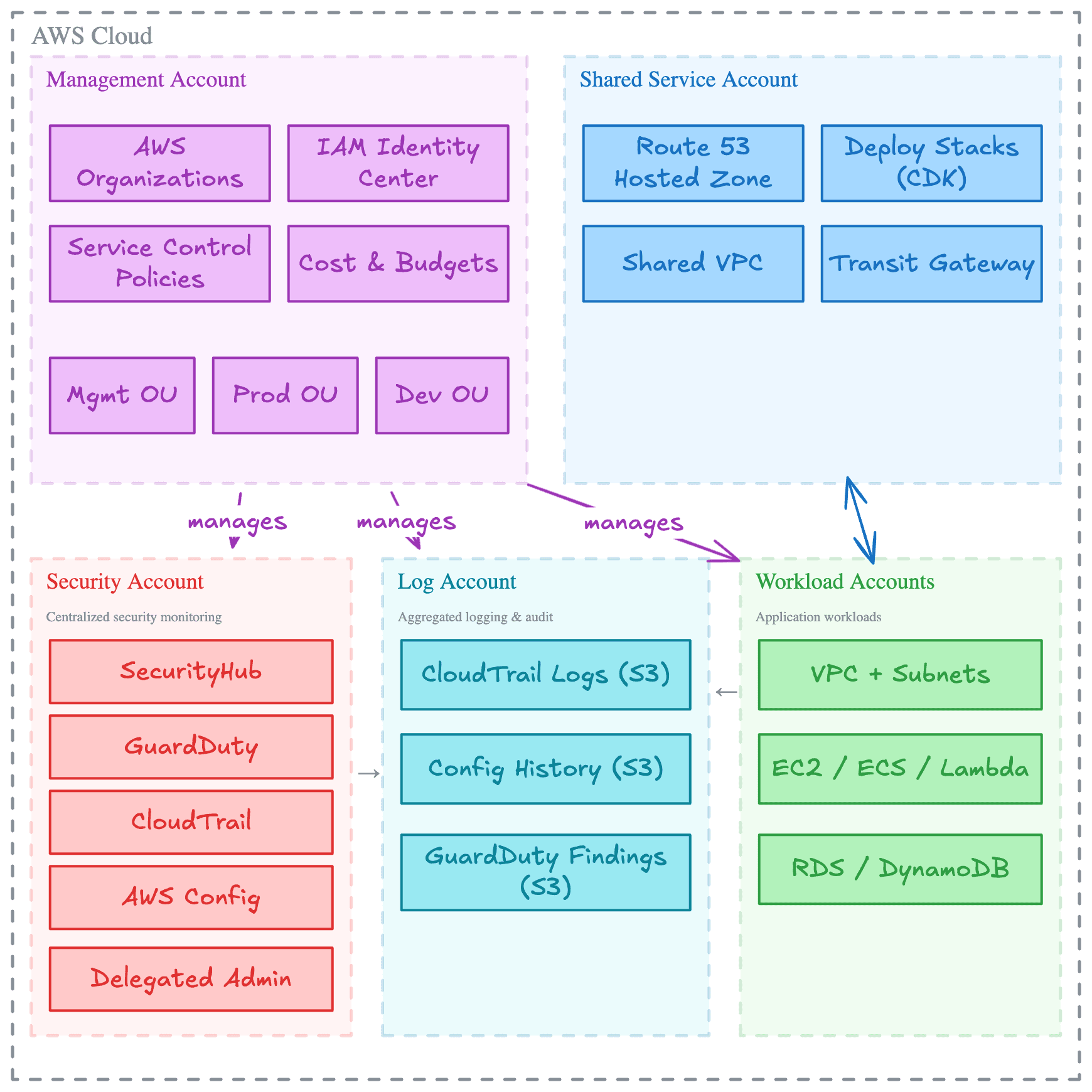
Blueprint of the AWS CDK Landing Zone: the management and landing zone accounts, the StackSets they deploy, and the security, log archive and workload accounts they reach
1 week
Typical deployment window for a production-ready AWS foundation
Minutes
To provision a new secure account once the baseline is in place
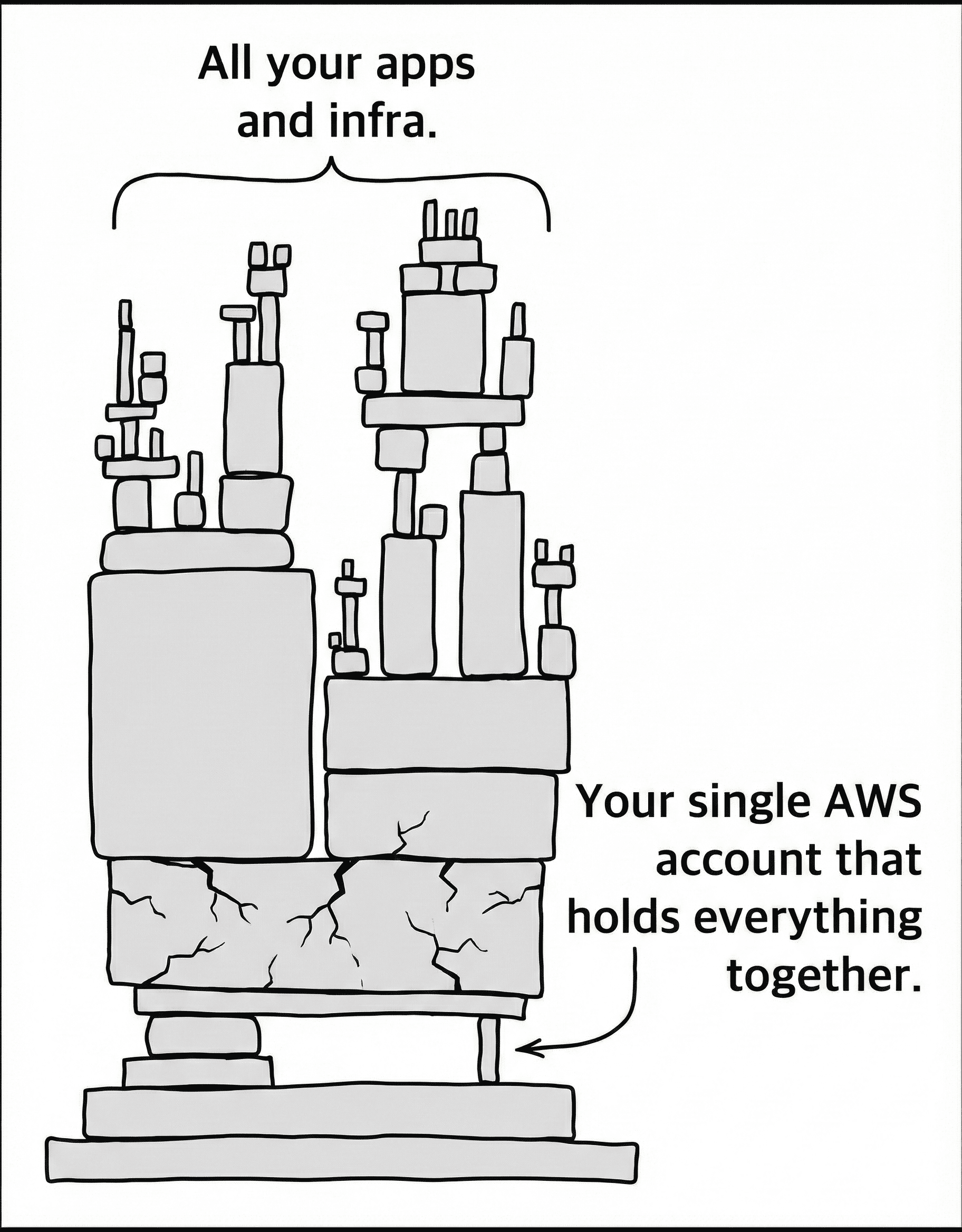
A comic of a tall stack of apps and infrastructure balanced on one small, cracked block labeled "your single AWS account that holds everything together"
When the single-account setup runs out

The setup that ships your first release rarely scales cleanly.

A few clicks in the AWS Console are enough to ship the first workload. Then dev, staging, and production start sharing one account, one set of limits, and one set of access patterns, and every new service inherits the blast radius of everything before it.

  1. 01
    A bug in dev can take down production
    Separate accounts per environment contain the blast radius.
  2. 02
    Service quotas become a shared delivery constraint
    Each workload gets its own account limits.
  3. 03
    Nobody can say which team the bill belongs to
    Account boundaries make cost ownership visible.
  4. 04
    Security and compliance turn into manual work
    Guardrails and baselines apply to every account automatically.
  5. 05
    IAM becomes a web of exceptions
    Access follows account boundaries instead of one shared policy set.
Shipped, not theoretical

What changes after the Landing Zone goes live.

The value is not the initial deployment. It is the baseline the team inherits afterward: clean account boundaries, new accounts in minutes, and a foundation that is easy to evolve.

“Before Towards the Cloud, we received a variety of proposals to provision our AWS landing zone. Danny's solution and AWS expertise stood out with comprehensive accelerators, documentation, and clearly articulated design principles. We achieved a perfect security score in days, not months, and TTC's ongoing support has been invaluable.”
Galen Simmons, Founder of Accolade
Galen Simmons
CEO & Founder, Accolade
Read the Accolade case study →
1 week
Typical deployment window for a production-ready AWS foundation
100%
Pass rate on the CIS AWS Foundations Benchmark
Minutes
To provision a new secure account once the baseline is in place

18+
Ready-to-deploy StackSets covering security, compliance, and account setup
Inside the landing zone

See the foundation before it lands in your AWS organization.

Opinionated where it matters, adaptable where your team needs room. Review the organization model, security controls, infrastructure code, and built-in guardrails before deciding if the baseline fits.

Multi-Account Architecture

A well-architected AWS Organization with dedicated OUs for security, log archive, infrastructure, and your development and production workloads, guarded by Service Control Policies attached at the root. A suspended OU even closes retired accounts automatically. See how the organization structure is defined in code.
  • Dedicated security and log archive accounts
  • Workload isolation per environment
  • Guardrails at the root
No waiting on AWS roadmaps

Yours to run and customize. You decide who maintains it.

With AWS Control Tower, the controls you get are the controls AWS decided to ship. This landing zone is plain AWS CDK with the full source code in your repository, licensed for use across your entire organization, so when your team needs a new account or guardrail, it is a pull request away.

  • The complete CDK codebase lives in your GitHub repository.
  • Add accounts, OUs, and Service Control Policies through pull requests, with the cdk diff posted for review.
  • One organization-wide license: no per-account fees and no proprietary glue.

See how adding an account works →

Merge it, and the pipeline deploys it.

The generated GitHub Actions workflow validates and deploys both phases on every merge to main: the organization in the management account, then the StackSets from the landing zone account. It signs in through OIDC, so no long-lived AWS keys sit in GitHub.

How the pipeline works →

Build it yourself vs us

Build it yourself, or have it running next week.

Your senior engineers can build a landing zone. The question is what it costs the roadmap, and who runs it afterwards.

Building a landing zone in-house compared with the AWS CDK Landing Zone
TopicBuild it in-houseAWS CDK Landing Zone
Time to a working foundation3 to 6 months of a senior engineer, part-timeAbout a week
Audit-ready controlsAnother quarter of hardening for SOC 2 or HIPAACIS AWS Foundations Benchmark controls from day one
Architecture decisionsMade for the first time, under deadlineAlready made on dozens of AWS environments
Your engineersPulled off the product roadmapKeep shipping, with no deployment freeze
Running it afterwardsUpdates, accounts, drift and cost on your teamPackage releases plus support plans from $399/month with security and cost dashboards and engineering hours
OwnershipYour codeYour code too: every line of CDK lives in your repository

The build is the smaller half. After it, the foundation needs security updates, new AWS features, new accounts, drift fixes and a watch on cost, every month. Our support plans cover that operations work, so the foundation stays current without pulling your engineers off the product.

AWS Landing Zone Deployment

Every control, guardrail, and automation, listed in full.

A CIS-compliant, multi-account AWS foundation built with AWS CDK. We migrate your existing accounts into it, so security guardrails, logging, identity, and account provisioning run as code instead of as manual platform upkeep.

No black boxes: the technical reference shows what each control deploys, and the roadmap shows what ships next.

Deployment is scoped after the free intro call, once we understand your account model, migration constraints, and the remediation your workloads need.

Compliance scores apply to the AWS foundation layer: organization, accounts, networking, and security services. Existing workload infrastructure may need separate remediation.

Security & Compliance12

Centralized Root Access
Member accounts carry no standalone root credentials. Root is managed centrally, so a lost or misused root password can no longer put an account at risk.
Organization CloudTrail
A single organization-wide audit trail records activity across every account, including the management account, and raises alarms on high-risk events like root usage and unauthorized API calls.
GuardDuty Threat Detection
Amazon GuardDuty watches every account around the clock for compromised instances, unauthorized access, and unusual API activity, with findings centralized for your security team.
Security Hub Posture Management
Aggregates security findings from across the organization into one dashboard and continuously scores every account against AWS and CIS benchmarks, managing the underlying AWS Config setup for you.
Show the other 8
Vulnerability Scanning
Amazon Inspector continuously scans EC2 instances, container images, and Lambda functions for known vulnerabilities across the organization.
Sensitive Data Discovery
Amazon Macie inspects your S3 estate for exposed sensitive data, so accidental exposure is caught before it becomes an incident.
EBS Encryption by Default
Every new EBS volume is encrypted at rest automatically, with nothing for workload teams to configure.
S3 Block Public Access
Account-level public access blocking prevents any bucket or object from being exposed to the internet by mistake.
Strong IAM Password Policy
Enforces minimum length, expiry, reuse prevention, and complexity requirements on every account.
Secure Defaults
Every account inherits the same hardening in one step: default VPC removed, EBS encryption on, public S3 access blocked, default security groups locked down, and a strict password policy applied.
Centralized Log Archive
CloudTrail and compliance data land in a dedicated, encrypted Log Archive account with access logging and lifecycle rules for compliant, tamper-resistant retention.
Encrypted Alerting
Security and compliance notifications flow through KMS-encrypted SNS topics scoped to your organization, so alerts reach the right people without exposing data.

Automated Account Provisioning5

Instant Account Provisioning
New accounts arrive ready to deploy to, with CDK bootstrap, encrypted asset storage, and a container registry already in place, so teams ship on day one.
Alternate Contacts
Security, billing, and operations contacts are set on every account automatically, so AWS notifications always reach the right people.
Marketing Email Opt-Out
New accounts are unsubscribed from AWS marketing email automatically.
Automated Account Closure
Accounts moved to the suspended unit are closed for you, with no manual offboarding steps or forgotten leftovers.
Show the other 1
Default VPC Removal
The default VPC is stripped from every new account and region, so workloads run only in networks you designed.

Operations & Cost Optimizations3

Cost Anomaly Monitoring
Detects unusual spending patterns across AWS services and alerts the team immediately, so overspend gets caught early.
Budget Alerts
Budgets notify you when actual or forecasted spend crosses your thresholds, keeping cost surprises off the invoice.
Service Quota Automation
Requests AWS service quota increases automatically as you grow, so limits don't block a launch.

Governance & Deployment5

Configuration Drift Detection
A daily check across the management and landing zone accounts flags anything that has drifted from the version-controlled baseline.
Delegated Administration & Guardrails
Security services run from a dedicated security account, and organization policy families like SCPs, tag, and backup policies are enabled and governed centrally, keeping day-to-day management out of the root account.
GitHub Actions Pipeline
A secure CI/CD pipeline deploys infrastructure changes through pull requests using OIDC, so there are no long-lived AWS keys to store or rotate.
AWS IAM Identity Center
Single sign-on is configured so your team signs in through an existing identity provider such as Entra ID, Okta, or Google Workspace.
Show the other 1
AWS Organizations via Code
Accounts, organizational units, and Service Control Policies are defined in AWS CDK, so governance changes go through code review and deploy consistently across the organization.
How the deployment runs

Three steps from AWS sprawl to a clean foundation.

The process is intentionally short: agree the account model, deploy the landing zone, then hand over a baseline your team can operate on its own.

  1. Up to 2 hours

    Kickoff and boundary design

    We review the current AWS organization, your compliance targets, and the account model the team needs, then agree access and the rollout plan.

    • Requirements captured
    • Target account model
    • Access and rollout plan
  2. About a week

    Deployment and account migration

    We deploy the landing zone through your pipeline, configure the guardrails, and move existing accounts into the new structure. Your developers keep shipping; there is no freeze window.

    • Landing zone live
    • Guardrails configured
    • Accounts migrated
  3. Right after

    Handover and knowledge transfer

    We walk the team through the codebase, the pipeline, and the security posture, so the foundation stays understandable after we step back.

    • CDK codebase in your repository
    • Pipeline walkthrough
    • Security posture review

Buy it through AWS Marketplace to keep procurement and billing inside your AWS account.

After the foundation is live

Manage it yourself, or let us keep it current

Run the foundation with your own team, or keep us involved for maintenance, security visibility, cost automation, and engineering hours, so your developers ship features instead of platform upkeep.

Support plans start from $399/month once the foundation is live.

Latest releases
  1. Cost recommendations and security controls fit your organization
  2. Manage organization cost recommendations from a FinOps account
  3. Restore Inspector administration across Regions more reliably

Improvements ship as package releases you pull in by bumping two versions. Read the changelog

Platform Maintenance

  • Landing Zone Security Updates
    Included
  • Landing Zone Feature Updates
    Included
  • CDK Construct Library
    Included
  • Feature Roadmap Requests
    Included

Security & Cost Visibility

  • Cloud Security Posture Dashboard
    Not included
  • FinOps Automation (OpenOps)
    Not included

Support & Engineering

  • Support Channel
    GitHub Issues
  • Cloud Engineer Retainer
    Not included
  • CDK Construct Development
    Not included
  • Hands-on Training (Workshops)
    Not included
Not quite the right fit?

Related services, and when to pick them

See all AWS services
AWS Landing Zone FAQ

What teams actually ask
before pulling the trigger

How is this different from AWS Control Tower?

Our Landing Zone is GitOps-first and ships with security and compliance baselines already configured. Control Tower still requires a lot of manual follow-up in the console to achieve the same posture. With our implementation, your infrastructure is version-controlled in CDK, changes flow through pull requests and CI/CD, and every account is compliant from the moment it is provisioned.

How is this different from AWS LZA, OrgFormation, or other third-party tools?

AWS Landing Zone Accelerator and OrgFormation give you primitives. You still need to wire them together, decide on the account model, write the security baselines, set up the deployment pipeline, and maintain it long-term. We deliver the full implementation as AWS CDK, with all of that already done: opinionated account structure, 18+ pre-configured stacksets, SCPs, GitHub Actions pipeline, and the compliance evidence to back it up. You skip the integration work and get the full source code, licensed for use across your organization. See what every StackSet deploys in the docs.

Why not have our senior engineers build the Landing Zone ourselves?

You can. The question is how long it takes, how much roadmap time it costs, and whether the result holds up under audit. A landing zone built from scratch is typically a 3 to 6 month project for a senior engineer working part-time, plus another quarter to harden it for SOC 2 or HIPAA. We deliver the same baseline in a week because we have already made the architecture decisions on dozens of AWS environments. Your engineers stay focused on shipping features, and every line of CDK ends up in your repository, yours to customize and extend for your organization.

Do we need to be pursuing SOC 2 for this to be worth it?

No. The compliance scores are a side effect of getting the AWS foundation right, not the reason to build one. Even without an audit on the horizon, the Landing Zone removes account sprawl, centralizes logging and monitoring, automates new account provisioning, and gives you safe defaults for IAM, networking, and S3. Most teams adopt it because their developers were spending too much time fighting infrastructure rather than because of a specific compliance deadline.

What if we want to manage it ourselves or switch consultants later?

The entire CDK codebase lives in your GitHub repository the moment we hand it over, licensed for use across your organization. No proprietary glue, no per-account fees, no vendor lock-in. Any AWS engineer familiar with CDK can pick it up, and the architecture uses standard AWS services everywhere. If our ongoing support stops fitting, you keep the foundation and walk away.

Will this disrupt our existing workloads?

No. We attach the Landing Zone to your existing AWS Organization and migrate accounts into the new structure without downtime. Your workloads keep running while we roll out guardrails gradually. Developers continue building with the tools they already know while the foundation improves around them. The two-phase deployment attaches to your existing organization without disrupting running accounts.

How long does the deployment take?

We start with a kickoff call (up to 2 hours) to gather requirements and discuss access. From there, the core Landing Zone is typically deployed within one week. The final handover and knowledge transfer session follows shortly after, so your team is confident operating it independently.

Do we need to pause development during deployment?

No. Your developers keep shipping while we work in parallel. The Landing Zone is deployed alongside your existing setup, and accounts are migrated without affecting running services. There is no freeze window and no downtime.

What if we need changes after deployment?

The entire Landing Zone is built with native AWS CDK and lives in your GitHub repository. Your team can modify OU structures, Service Control Policies, security controls, and account configurations through pull requests, following the step-by-step guides in the docs. The architecture scales to hundreds of accounts, so it grows with you. If you want our help, our ongoing service tiers include a cloud engineer retainer for exactly this.

How do we know what changed in a new release?

The changelog summarizes each month's releases: new features, improvements, and fixes across the foundation, constructs, and core packages, plus the development activity behind them. When a release is out, you pull it in by bumping two version pins and redeploying, following the update guide. Breaking changes and migration steps come to you directly with the release they affect.

What happens if something goes wrong after handover?

If you are on one of our ongoing service tiers, we are available via Slack or GitHub Issues depending on your plan. If you chose to self-manage, you still own the full codebase and documentation. Any AWS engineer familiar with CDK can troubleshoot and resolve issues. The Landing Zone uses standard AWS services, so there is nothing proprietary that could block you.

What does the pricing look like?

Every environment is different, so the deployment is priced after the live demo, once we understand your account model, migration constraints, security controls, and how much workload remediation the move needs. You get one fixed quote before any work starts. Optional ongoing support starts from $399/month after the foundation is live. See the support comparison for the tier breakdown.

See it live

Book a live demo

We look at your AWS setup, then show you the landing zone live: account isolation, guardrails and automation, before anything touches your AWS.

You talk to Danny Steenman, the engineer who does the work. Pick a time below and he confirms it by email.

  • Free 30-minute demo, no commitment
  • Live walkthrough of the landing zone
  • Pricing scoped to your setup after the demo